



Adding an offset path and stroke to a group of objects
I have a group that contains multiple objects. I am trying to add an offset path on each object, then add a 1pt black stroke to each object and each offset path.
The offset paths are being created (almost) correctly, but the stroke is only being applied to one object - from what I can tell, it seems to be the back-most object in the group.
I originally had the stroke being applied inside the first for loop, when I was adding the offset path, but expandStyle then made the path into a new object, which I don't want, so I moved the stroke logic to the end.
Can anyone see what I need to change to get the stroke on all objects and offset paths?
And bonus question ... if my object is a square, the offset path created is a filled square. But if my object is a triangle, the offset path is a triangle with a hollow middle - a compound path. Is there a way to make it fill that in so I have a solid triangle which I think should just be a path?
        var offsetEffectString =
            '<LiveEffect name="Adobe Offset Path">' +
            '<Dict data="I jntp 2 R mlim 4 R ofst 18"/>' +
            '</LiveEffect>';

        // Go through each item in the group
        var groupItems = selection[0].pageItems;
        for (var i = groupItems.length - 1; i >= 0; i--) {
            var item = groupItems[i];

            var offsetPath = item.duplicate();
            offsetPath.selected = true;
            offsetPath.applyEffect(offsetEffectString);
            offsetPath.filled = true;
            offsetPath.fillColor = white;
        }

        app.redraw();
        app.executeMenuCommand('expandStyle');

        // Re-fetch the pageItems collection after expanding styles
        groupItems = selection[0].pageItems;

        // Apply stroke to all items
        for (var i = groupItems.length - 1; i >= 0; i--) {
            var item = groupItems[i];
            if (item.typename === "PathItem") {
                // Apply stroke to PathItem
                item.strokeColor = black;
                item.strokeWeight = 1;
            } else if (item.typename === "CompoundPathItem") {
                // Apply stroke to each path in CompoundPathItem
                for (var j = 0; j < item.pathItems.length; j++) {
                    var subPath = item.pathItems[j];
                    subPath.strokeColor = black;
                    subPath.strokeWeight = 1;
                }
            }
        }
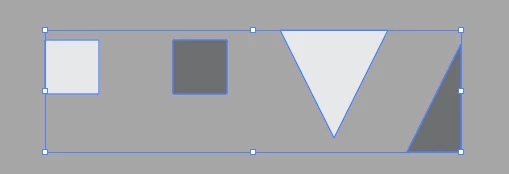
Before:
After:
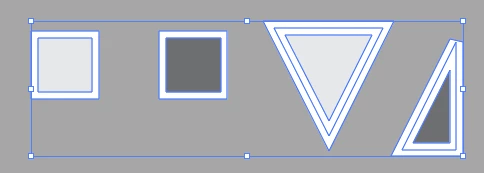
Only the dark triangle has the stroke.
(Also, I noticed the offset paths are not all being moved behind the original objects, but I know how to fix that)
 AdChoices