Participant
June 13, 2021
Answered

Adding anchor points tool

  • June 13, 2021
  • 3 replies
  • 2961 views

Hi, I want to ask you guys about how to add anchor points.

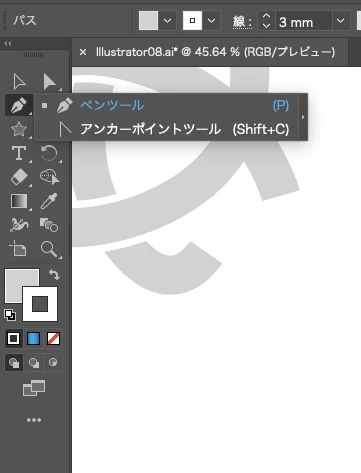
In my illustrator, Adding anchor point tool isn't displyayed like attaching my picture(sorry,my illustrator is not English. however just 2 comands is placed in the Pen tool).

You know how to solve this probolem?

thanks.


This topic has been closed for replies.
Correct answer tromboniator

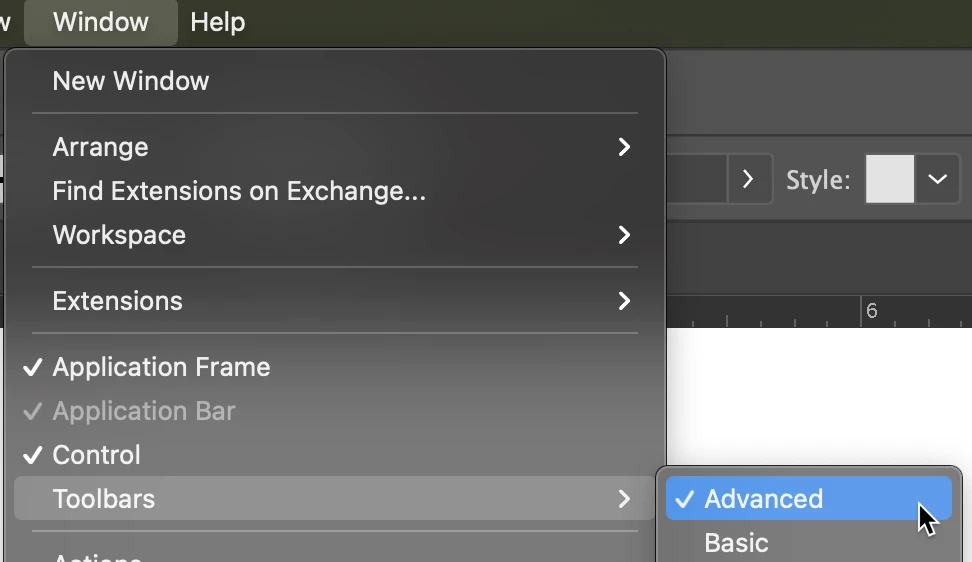
In the Window menu, select Toolbars > Advanced

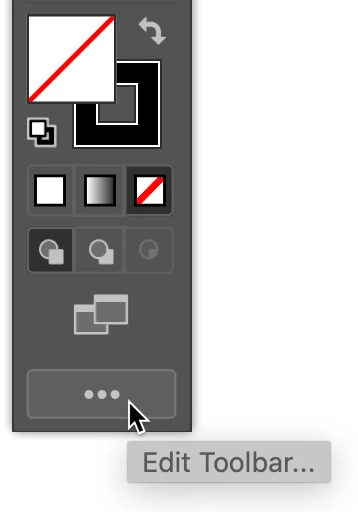
or click the Edit Toolbar icon (ellipsis or three dots) at the bottom of the Toolbar to add the desired tools.


Peter


3 replies

tromboniator
Community Expert
Community Expert
June 13, 2021

You're welcome, 大希5C38, and thanks (and Hi!) as always to our dear friend Jacob.


Peter

Jacob Bugge
Community Expert
Community Expert
June 13, 2021

大希、


In addition to what Peter said, you can see this help page about using Tools in both English and Japanese, the latter showing exactly how it looks in the Japanese version, with all the instructions in Japanese:


https://helpx.adobe.com/illustrator/using/tools.html


https://helpx.adobe.com/jp/illustrator/using/tools.html


Edit: Hi Peter.


tromboniator
Community Expert
tromboniatorCommunity ExpertCorrect answer
Community Expert
June 13, 2021

In the Window menu, select Toolbars > Advanced

or click the Edit Toolbar icon (ellipsis or three dots) at the bottom of the Toolbar to add the desired tools.


Peter


Participant
June 13, 2021

thanks, Peter.

it worked perfectly!