Participant
December 3, 2023
Answered

Adding stroke around text - how to get rid of pointy lines / make stroke smoother

  • December 3, 2023
  • 1 reply
  • 641 views

I've added a stroke around some outlined text, but there are these small spiky points that appear, and I'm looking for a way to get rid of them, I've tried changing the cap and corner stroke settings, which has removed the spiky points, but also changes the shape of the stroke which I dont want. The stroke needs to look like the example below, still needs square corners etc. Any help would be great! 🙂

This topic has been closed for replies.
Correct answer Monika Gause

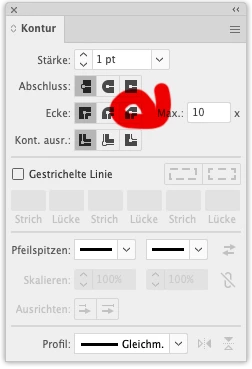
This one here: 

1 reply

Monika Gause
Community Expert
Community Expert
December 3, 2023

So setting them to chamfer is also not right?


Maybe try not using a stroke, but instead adding a black fill an d using Offset path effect on it?

Participant
December 7, 2023

Thanks for replying!

I'm not sure what you mean by setting them to chamfer, would it be possible to explain a little more about that?

Monika Gause
Community Expert
Monika GauseCommunity ExpertCorrect answer
Community Expert
December 7, 2023

This one here: