Participant
September 19, 2024
Question

Adding superscript in a line disables other opentype features?

  • September 19, 2024
  • 2 replies
  • 450 views

First post here, hopefully the question hasn't been asked before, but I couldn't find an answer for it.


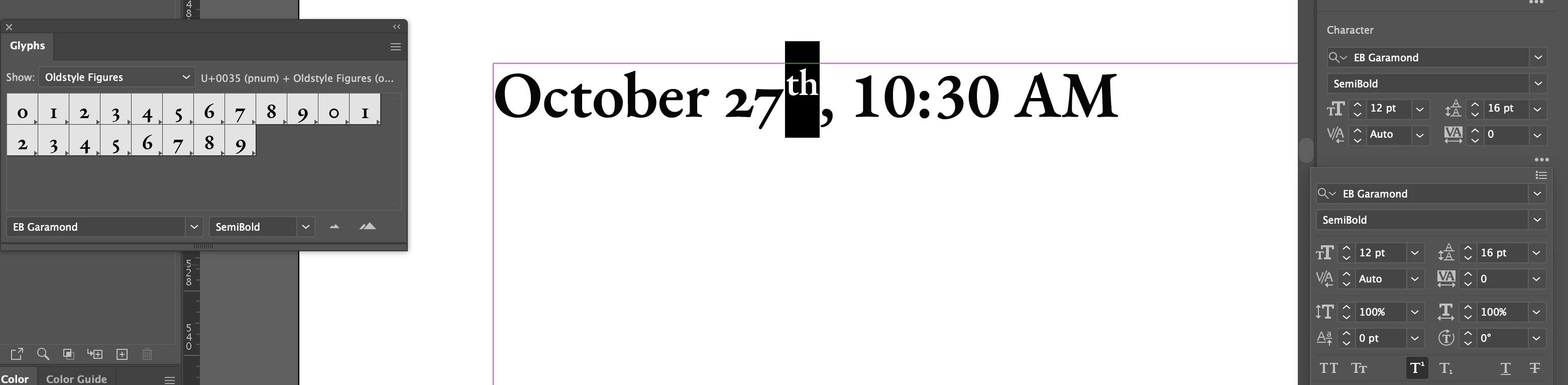
No matter how I input them, I can't seem to have both superscript and other opentype features, specifically old style numerals and small caps, in the same line of type. As soon as I enter superscript glyphs, the other features revert to regular text (see images).


It happens whether I add superscript glyphs from the glyphs window or from the toggle button in the character window. I don't see any reason the two features should be incompatible, right? Maybe it's a problem with the font? It's happening with EB Garamond Semibold (gotten through Adobe fonts), though I checked and the same problem persists with other fonts.


I'm not sure if it's a bug, a usser error, or if there's something I just don't understand about opentype.


Illustrator 28.7.1 on MacOS 14.6.1

 

This topic has been closed for replies.

2 replies

Mike_Gondek10189183
Community Expert
Community Expert
September 20, 2024

Try with Minion Pro. There are lots of programming mistakes on the programming of fonts for those features. These features have been around so many years but very few fonts have them programmed perfeclty.

Kurt Gold
Community Expert
Community Expert
September 20, 2024

As far as I can see, this is not a font-specific issue. All OpenType fonts are affected by this new Illustrator bug.


That is, using Minion Pro won't help in this case.

Kurt Gold
Community Expert
Community Expert
September 19, 2024

I can reproduce this terrible misbehaviour in Illustrator 28.7.1. Certainly this is a bug.


It also happens when you change Baseline Shift, Vertical / Horizontal Scale and Character Rotation.


It works well in version 28.6.

TMcMorranAuthor
Participant
September 19, 2024

Thanks! Glad it's not just me.