Known Participant
March 7, 2018
Question

Adjust dashes is not possible via Scripting (SVG export dashes problem)

  • March 7, 2018
  • 2 replies
  • 1035 views

Hello,

it is not possible to use this function in the Stroke menu in Illustrator 2015 via Scripting:

This is the reason, why I use this Javascript function:

s.h's page : Scripts for Adobe Illustrator CS

Now I have a Problem, when I export a drawing in SVG format.

I have today a discussion in the Illustrator forum:

Export SVG changed the dashed line

The end of the discussion was, that the SVG export works, when I use the internal Illustrator function.

Unfortunately the SVG export does not work with the Javascript function.

I use the Javascript function in Illustrator. And the drawing looks fine in Illustrator:
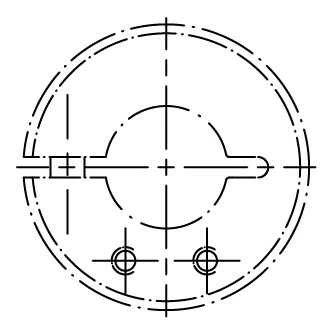
But when I export the drawing in SVG Format, then center line is wrong:
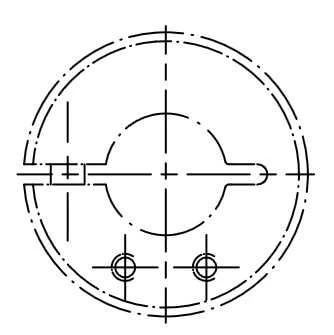
When I adjust the dashes with the internal Illustrator function, then the SVG export looks fine.

Note: The drawing is imported in Illustrator from DWG format.

What can I do?

Can I use the internal Illustrator function in the newest Version via Scripting?

Is there an update of the Javascript function?

Any other workaround possible?

Best regards

Harald

This topic has been closed for replies.

2 replies

Disposition_Dev
Legend
March 8, 2018

Can you save a graphic style with your preferred stroke settings and then access the graphic style via script and apply it to a path(s)?

Loic.Aigon
Legend
March 8, 2018

You may as well play on SVG coordinatePrecision property. Raise it to max and see if there is any changes :

https://www.indesignjs.de/extendscriptAPI/illustrator-latest/#ExportOptionsSVG.html

Known Participant
March 8, 2018
  1. The coordinatePrecison=7 gives also wrong result.
  2. I have no experience with graphic styles for center lines.
  3. When I use Object->Path->Outline stroke before SVG export it works!
    But I am not sure, if there are other negative effects?

I have done a lot of tests now!

It looks like a scaling problem, because the SVG Export works, when I open my DWG file with scaling=5 instead scaling=1.

Loic.Aigon
Legend
March 8, 2018

Not sure it will be the perfect answer but you could outline the paths prior to svg exports.

//Outlining stroke (given it's previously selected)

app.executeMenuCommand("OffsetPath v22");