
Mike_Gondek10189183
Community Expert
Community Expert
July 21, 2017
Answered

Adjusting a Series of Tabs

  • July 21, 2017
  • 11 replies
  • 1659 views

Is there a way I can grab for example the tabs within the red border, and move each to the right by 18points.
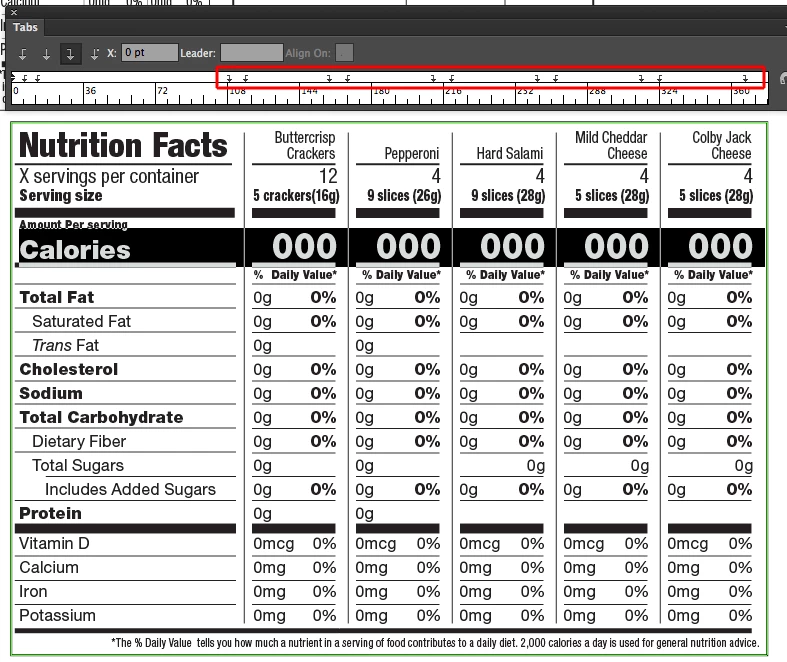
Would be great to  drag and drop around a series of tabs, and click a button to increase / decreases / scale the values in the tabs stops. Would such a feature be useful to you?

    This topic has been closed for replies.
    Correct answer Jeff Witchel, ACI

    In InDesign, you could use Paragraph Rules (Paragraph panel options menu) or Custom Underlines (Character panel options menu).

    Here's a video tutorial about Paragraph Rules: http://www.jeffwitchel.net/2011/11/indesign-fun-with-paragraph-rules/

    Here's a tutorial about Custom Underlines, starting at 1:10 into the video: http://www.jeffwitchel.net/2012/04/do-you-know-the-secret-backdoor-to-type-options-in-indesign/

    11 replies

    JonathanArias
    Legend
    July 24, 2017

    i would personally prefer that instead of new features we can get all of the features to be in the same locations in the drop down menus for Illustrator, photoshop and Indesign.

    JonathanArias
    Legend
    July 24, 2017

    ahhhh..  i would have slit the percentage cell vertically do to left or right alignments.

    Barb Binder
    Community Expert
    Community Expert
    July 24, 2017

    When you get to the body of the table:

    I'd use em spaces in lieu of indents in the first column (to minimize overrides and styles) and use a right indent tab between 0g and 0%. In the table the shortcut I mentioned earlier doesn't work, so it's Type > Insert Special Character > Right Indent Tab.

    Finally, these values repeat so if it were me I'd start with placeholder text:

    • type in the first cell
    • tap Ctrl/Cmd / to copy select the cell contents, copy
    • highlight all the other cells, paste
    • edit to the correct values
    ~Barb at Rocky Mountain Training
    Mike_Gondek10189183
    Community Expert
    Community Expert
    July 24, 2017

    Thanks Barb I was looking for text frame options or something similar but could not find. Your screenshot was very helpful as had to select by row not character to get my tools to match yours.

    Like your idea of using em spaces rather than another tab stop.

    Barb Binder
    Community Expert
    Community Expert
    July 24, 2017

    That's great. (My answers are influenced by laying out more tables any normal person should be expected to complete in a lifetime. )

    Any more questions, just ask.

    ~Barb

    P.S. Should we move this to the InDesign forum? Happy to take care of it. I initially thought you had a plan for a plug-in to automate tab movement in Illustrator.

    ~Barb at Rocky Mountain Training
    JonathanArias
    Legend
    July 24, 2017

    you cells styles is where you will control the position of the text inside the cell. Middle aligment, left right top and bottom spacing ( or padding) can all be adjusted independent and you can update the style i made you, or make a new one.

    JonathanArias
    Legend
    July 24, 2017

    sorry, sent you the wrong file.  i did made you a cell style that gives you padding top and bottom for the line under the text to have breathing room. take a look at the new file.

    here:

    Table_nutrition fact.indd - Box

    Mike_Gondek10189183
    Community Expert
    Community Expert
    July 24, 2017

    Thanks Jonathan, that makes sense.

    JonathanArias
    Legend
    July 24, 2017

    here you go Mike, i started it for you, take a look at the cells styles, table style, and paragraph styles. you can edit these as you need, but this is the foundation to help you get going, happy to help you further.

    Nut Facts Table.indd - Box

    Mike_Gondek10189183
    Community Expert
    Community Expert
    July 24, 2017

    Thanks. The file you attached looked no different than mine, but no worries. Paragraph rules was a great suggestion, but do not think in the end they will work with 2 lines of type, as the rule is offset. Might be easier to manually draw the rules in InDesign.

    Illustrator works great with using a transform effect on a group of rules to make the first column with 4 repeats for the additional ones needed.

    Thanks all. Sorry this went into InDesign rather than Illustrator, but was curious.

    Barb Binder
    Community Expert
    Community Expert
    July 24, 2017

    In your first screen shot, Nutrition Facts is larger than in the last one, that's why they are offset. You don't need to draw the lines manually, for sure!

    ~Barb at Rocky Mountain Training
    Barb Binder
    Community Expert
    Community Expert
    July 24, 2017

    Looks like you are in good hands, now, Mike! Let us know if you have any more questions. That's a pretty straightforward table in InDesign. Any by nesting Table, Cell and Para styles you can set up additional tables with the same look pretty darn fast.

    ~Barb at Rocky Mountain Training
    JonathanArias
    Legend
    July 24, 2017

    thats what i was about to do for you mike, i am making you rules and setting up the basic structure of the table as we speak

    JonathanArias
    Legend
    July 24, 2017

    like this?

    Barb Binder
    Community Expert
    Community Expert
    July 22, 2017

    I wouldn't need that in Illustrator. I would definitely create that table (ok, any table) using InDesign (or FrameMaker). In either application, I would start with a table—which minimizes the need for any tabs. The only one I'd have to add to InDesign is a right-indent tab (Shift+tab) between the grams the percentages.

    That said, I know there are some folks who only use Illustrator for layout, and for that specific group yes, I suspect that would be useful.

    ~Barb

    ~Barb at Rocky Mountain Training
    Mike_Gondek10189183
    Community Expert
    Community Expert
    July 24, 2017

    Thanks for the feedback could see some advantages to using the InDesign table feature  for this. Not sure you could do the rules underneath though, but am not a daily user of InDesign.

    Any ideas how to do exactly what is shown in my first post. This is where I got stuck with using either the table  or characters features to make the rules. I obviously do not want rules underneath Buttercrisp, and for them to span the cell width with a 2 point gap

    Below is  the file incase that is easier for you

    http://files.kaleidoscopechicago.com/_dAa0ObVbNTytNR

    Nut Facts Table.indd

    976 KB

    The URL will expire on Aug 23.

    Jeff Witchel, ACI
    Community Expert
    Jeff Witchel, ACICommunity ExpertCorrect answer
    Community Expert
    July 24, 2017

    In InDesign, you could use Paragraph Rules (Paragraph panel options menu) or Custom Underlines (Character panel options menu).

    Here's a video tutorial about Paragraph Rules: http://www.jeffwitchel.net/2011/11/indesign-fun-with-paragraph-rules/

    Here's a tutorial about Custom Underlines, starting at 1:10 into the video: http://www.jeffwitchel.net/2012/04/do-you-know-the-secret-backdoor-to-type-options-in-indesign/