
Participant
April 8, 2022
Question

Adobe Ai saving two files each time

  • April 8, 2022
  • 1 reply
  • 179 views

Hi, 

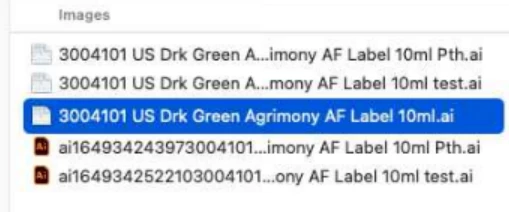
I have a MAC user and they use Illustrator. When ever they saving a file it's saving twice one file.

file named ......test2 has the .ai file which is correct, but also has created the other AI file with the actual AI icon but when you select the filepath, the file description shows zero bytes - so this is also unchanged

Also it doesn't allow me to delete those Zero Bytes files (it says it's in use)
This topic has been closed for replies.

1 reply

Monika Gause
Community Expert
Community Expert
April 8, 2022

Where are you saving those files? On the harddisk?


Can you try and turn off "Save in background" in the Illustrator preferences?

Does that help?

Participant
April 8, 2022

It's trying to save on a network server drives. 

I can ask my user if they can try that next week if that works. but i think i tried that but it was still the same results. 

is there anything else you suggest?


Monika Gause
Community Expert
Community Expert
April 8, 2022

Saving on a network might cause this. Illustrator has known issues with this and there might also be server configurations that just don't cooperate well.

You can try if it helps to turn off the "save better over slow network" preferences setting. But that's all.

If it still doesn't work, then you have to either adjust the network or just don't directly save to the server. And instead save to the local disk and then move to the network (or copy)