Adobe Autosave not showing me the saves I am looking for.
So I have been looking around for a while and not finding something to help me. I am working on a file in Illustrator with autosave on and set to 2 minutes. I am fairly certain I saved the file at the end of the day on Tuesday before I left for vacation. I went to open the file on Thursday because I needed to send something to my boss, and it had reverted to a save from earlier in the day on Tuesday so I could not send the file.
When I got home from vacation today I looked for the file on the computer I was working on it on and could not find any temp files or any trace of the file, and of course could not find anything in the version history from the time period I needed it restored to. Where can I find the minute-by-minute autosaves and why is Adobe still dropping the ball with autosave? I really hope you don't screw up Figma, if I wasn't making specific charts that require a certain process I would be happy never to use Ill-lose-strator again. This is about the 10th time I have lost hours of work due to Illustrator being a junk program. Due to this, my save game is strong, but evidently not enough to outsave an unforced error. in the cloud
So to recap I am looking for any of the minute-to-minute autosaves that should exist between the dates. I had autosave turned on so why can't I see them? As far as I can tell these are likely the saves I did on my own, not including the one that's missing from around 5:30 or 6:00. No file shows up on the computer I am working on based on all the troubleshooting I have done through the available online help.
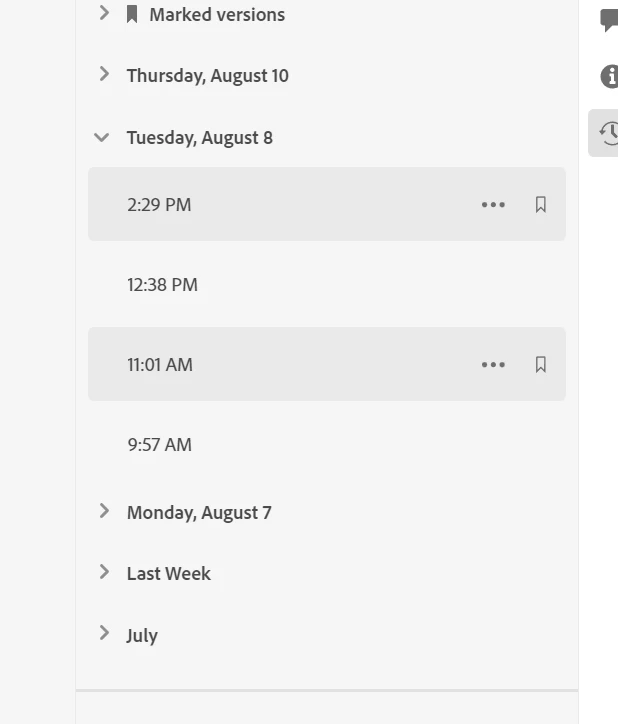
I worked with a coworker to make many corrections not all of which I will be able to remember when redoing this file, as I'm sure even if someone from Adobe can help me it will be way after my deadline. Please refund me my subscription, for this month. (Really the last three months if you want to be closer to making up for the hours of re-working I am about to do).
 AdChoices