

The Smiling Lion
Participant
November 15, 2016
Answered

Adobe Illustrator 2017 JPG export CMYK to RGB bug

  • November 15, 2016
  • 14 replies
  • 17318 views

Hi! There's a problem I've found today.

After editing a CMYK document I was trying to export a JPG preview in RGB mode through Export As (and then Export for Screens as well) - but Illustrator was still exporting in CMYK! And it was reseting exporting settings to default (it's strange, but it even reseting the image quality to 0). Checking Embed sRGB profile doesn't have any effect.
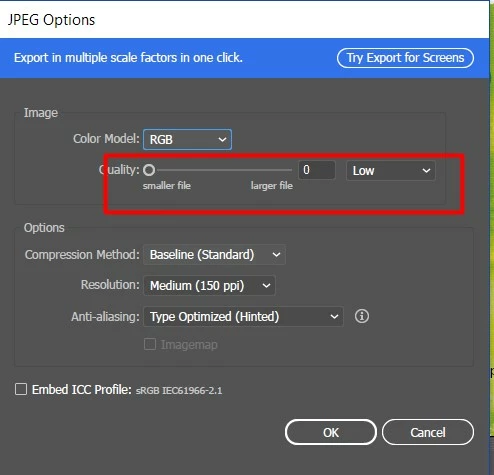
Exporting to PNG is a small desicion of the problem - but I need JPG.

The was no such a problem in previous verison of Illustrator.

Any ideas? Thanks!

This topic has been closed for replies.
Correct answer belalm53690920

If you have Illustrator CC 2015 installed, you can create a new Action maybe name it "Export JPG to Desktop" and do exporting RGB image with your preferred resolution to Desktop, then Save this Action and load it in CC 2017 to use it when you need to export RGB images till Adobe able to fix this bug

14 replies

Participant
November 17, 2016

Same problem here. But using export to web doesn't fix this for me. My JPGs are still in CMYK.

Ton Frederiks
Community Expert
Community Expert
November 17, 2016

Try File > Export > Save for Web (Legacy)...

Participant
November 19, 2016

That's a good workaround when you have to export just one artboard. But when you have lots of artboards to export at the same time, it gets really annoying.

Baughans Trader
Participant
November 17, 2016

Submitted a report too, my jpg sizes are quadrupling too than what they should be.  Looks like I'll have to proof using export to web instead until Adobe fix what was working fine before.

Doug A Roberts
Community Expert
Community Expert
November 16, 2016

tried a few tests and this seems to be the case. might be time for a bug report:

Feature Request/Bug Report Form

Participant
November 19, 2016

That's what i wrote in bug report. (English is not my first language. there might me grammar mistakes)

******BUG******

Concise problem statement:

In a CMYK document (CC 2017), when I try to export a JPG preview in RGB mode through Export As (and then Export for Screens as well), Illustrator still exports in CMYK. Checking Color Mode RGB and Embed sRGB profile doesn't have any effect.

Steps to reproduce bug:

1. Open a CMYK document in Illustrator CC 2017.

2. Go to Export as, save the jpeg in a random folder.

3. Select RGB Color mode and then click ok.

Results: CMYK jpg file

Expected results: RGB jpg file (like it was in all previous versions of Illustrator CC)

There is a workaround, exporting it via save for web, but it gets really annoying when you have to export multiple artboards at the same time.

Peteris Karklins
Known Participant
November 16, 2016

I also thought, that checking ICC profile would crack the bug, but no luck

Strange, that  there's no one else complaining...

Monika Gause
Community Expert
Community Expert
November 16, 2016

Peteris Karklins schrieb:

I also thought, that checking ICC profile would crack the bug, but no luck

Strange, that there's no one else complaining...

There already have been complaints and IIRC the engineers have already posted in one of these threads. But reporting it will be the most secure way to ensure that it doesn't get lost.

The Smiling Lion
Participant
November 16, 2016

I've sent a bug report several minutes ago. Hope they'll repair it soon.