
Stephen Barrante
Inspiring
Apr 8, 2026 5:42 PM UTC
Answered

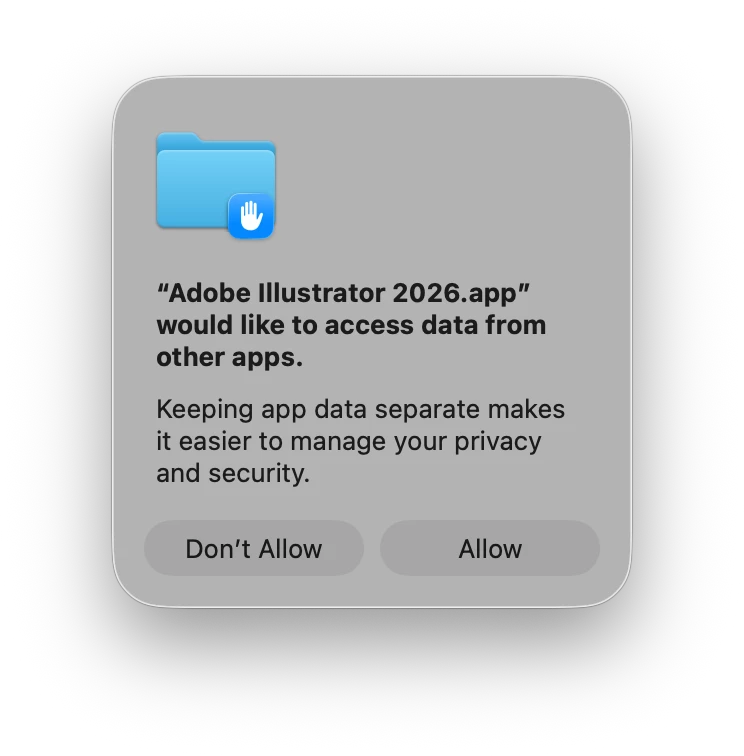
"Adobe Illustrator 2026.app" would like to access data from other apps."

Across our studio we are getting pop-ups each time we launch a Creative Cloud application asking each user to “Allow”, for the message:

"Adobe Illustrator 2026.app" would like to access data from other apps.


This is typically something we would only expect once during initial installation or a major update. This is now happening every time the app is launched. (See attached image). 

We’re experiencing this on all recent versions of Mac OS up to 26.4. On a variety of machines (Mac Book Pro, Mac Studios, all Apple Silicon), and it has only just starting in the past couple of weeks.

Is anyone else experiencing this, and have you found a work around?


    Anubhav M
    Anubhav MCorrect answer
    Community Manager
    Jul 16, 2026 2:01 PM UTC

    Hello everyone,

    Our team has tried fixing this with the latest version of Illustrator. Kindly update Illustrator to the latest release (https://helpx.adobe.com/creative-cloud/apps/manage-apps/creative-cloud-apps/update-creative-cloud-apps-manually.html) and let us know how it goes.

    Anubhav

    24 replies

    Participant
    Oct 24, 2026 5:22 PM UTC

    I have the same issue. It started recently AFTER the Adobe apps were automatically updated 14 days ago.

    Translate
    Anubhav M
    Community Manager
    Community Manager
    Oct 26, 2026 3:03 PM UTC

    Hello ​@Kim32543049gm58 


    I’m sorry to hear you’re having similar issues with Illustrator. Would you mind checking for any pending macOS/Illustrator updates and installing them to see if it helps resolve the problem?
     

    Also, try enabling Full Disk Access for Illustrator under System Preferences and share your observations.


    Looking forward to hearing from you.
    Anubhav

    Translate
    Known Participant
    Aug 6, 2026 4:26 PM UTC

    I am on 30.7

    Translate
    Anubhav M
    Community Manager
    Anubhav MCommunity ManagerCorrect answer
    Community Manager
    Jul 16, 2026 2:01 PM UTC

    Hello everyone,

    Our team has tried fixing this with the latest version of Illustrator. Kindly update Illustrator to the latest release (https://helpx.adobe.com/creative-cloud/apps/manage-apps/creative-cloud-apps/update-creative-cloud-apps-manually.html) and let us know how it goes.

    Anubhav

    Translate
    Known Participant
    Jul 29, 2026 5:14 PM UTC

    Wrong - I am running the latest version and it still shows up. 

    Translate
    graphics_4075
    Inspiring
    Jul 29, 2026 9:54 PM UTC

    Happening for me too still. Try, try again!

    Translate
    Cheers
    Participant
    Jul 7, 2026 2:53 AM UTC

    Why is the solution to the question “adobe would like to access data from other apps”, “oh just grant the access”? Is there no permanent way to shut this off? I do not want any of my programs accessing information from each other.

    Translate
    Harshika Verma
    Community Manager
    Community Manager
    May 21, 2026 11:00 AM UTC

    Hi All, 

    Thank you for reaching out. We completely understand how frustrating this situation can be, and we appreciate your patience.
     

    This is a known issue, and our team is actively working on a resolution. In the meantime, you may try a workaround by granting Full Disk Access through your macOS settings, as this has helped stop the prompt for some users.
     

    Additionally, since Illustrator is not showing in the list, could you please let us know what happens when you click the “+” icon at the bottom and try to manually add Illustrator?
     

    If the issue persists, we recommend using the Cleaner Tool to perform a fresh uninstall and reinstall of Adobe Illustrator.
     

    Please let us know how it goes or if you need any further assistance. We’re here to help

    Thanks,

    Harshika

    <Marking this as correct to highlight at the top for new users>

    Translate
    Participant
    Aug 31, 2026 3:13 AM UTC

    We should not have to grant Adobe full disc access to stop pop ups - especially when choosing not to share information from other apps. This “workaround” only gives Adobe even greater access to users’ private data. This is not a real solution and is completely unacceptable. 

    Translate
    Participating Frequently
    Apr 13, 2026 9:52 PM UTC

    I came here to ask the same question. I agree that this usually happens after a major update, then goes away. But for me, it persists with Illustrator. Every time. But not InDesign, Photoshop or After Effects. Mac Studio, Tahoe (latest).

    Oddly, though, granting full disk access is not an option (see screenshot). Photoshop is not on the list, but the message has gone. I believe it’s an Illustrator bug.

    It’s not catastrophic, but it is annoying.


    Translate
    Anubhav M
    Community Manager
    Community Manager
    Apr 14, 2026 7:07 PM UTC

    Hello ​@Garycrilley 


    I’m sorry to hear you’re having similar trouble with Illustrator. If Illustrator is not present on the list, click the + symbol to manually add the application (https://helpx.adobe.com/lightroom-classic/help/video/allow-permissions-video.html).
     

    Looking forward to hearing from you.
    Anubhav

    Translate
    Participant
    Aug 31, 2026 3:16 AM UTC

    Forcing users to grant full disc access is not a real solution and only makes this issue worse for those who don’t want to share data from other apps. 

    Translate
    tract97283658
    Participant
    Apr 13, 2026 5:26 PM UTC

    Why does it need access to other apps? and which ones?

    Translate
    Participating Frequently
    Apr 13, 2026 9:54 PM UTC

    Example: place a Photoshop image in your Illustrator file, then ‘edit linked file’.

    Translate
    Tina_Irvine
    Community Expert
    Community Expert
    Apr 8, 2026 9:40 PM UTC

    Hi ​@Stephen Barrante,

    I’m on Tahoe 26.2 (I often hesitate on updating my OS for a bit). For comparison, the toggles are working perfectly on my OS version.

    Translate
    Tina_Irvine
    Community Expert
    Community Expert
    Apr 8, 2026 6:07 PM UTC

    Hi ​@Stephen Barrante, to remove the notification, go to your System Settings > Privacy & Security > Full Disk Access. Flip the switch on.

    Translate
    Stephen Barrante
    Inspiring
    Apr 8, 2026 6:41 PM UTC

    Hi Tina, appreciate the reply. First looked there to see what was up and made sure they were toggled on. The apps have been installed for a while. Unfortunately the settings aren’t “sticking”. I haven’t tried uninstalling / reinstalling - since the problem isn’t exclusive to one app. Thinking it might be more systemic (e.g. a bug with CC and the OS), I wanted to see if it’s more widespread. It’s unusual that it’s suddenly affecting many of the machines here.

    Translate
    Anubhav M
    Community Manager
    Community Manager
    Apr 8, 2026 8:27 PM UTC

    Hello ​@Stephen Barrante 


    This does seem troubling. Could you check if the problem persists when running Illustrator under a different administrator account (macOS)?


    Looking forward to hearing from you.
    Anubhav

    Translate