Participant
June 20, 2018
Answered

Adobe Illustrator CC 2017 Panel Label Overlapping

  • June 20, 2018
  • 2 replies
  • 458 views

I am working in AI CC 2017 on a PC using Windows 10 64 bit.  I have a panel label that looks like it has overlapping text in the label.  If I double click the layer, it only shows one set of text, but it still overlaps. 
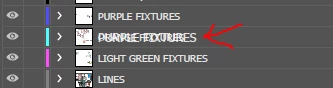
Any idea why it is doing this?  It also stays right there in the panel, so if I move this group down, whatever came next is then hidden under the overlap (which seems to be the same name as the group above--PURPLE FIXTURES.

This topic has been closed for replies.
Correct answer Mike_Gondek10189183

Redraw issue. Try restarting your computer. I have seen few issues like this, and they usually go away and do not return.

2 replies

sharp_hands16B8
Community Expert
Community Expert
June 20, 2018

Reset your workspace, or restart your machine. See if that fixes it.

MicjaAuthor
Participant
June 21, 2018

Thanks to both Mark-heaps and MikeGondek.  After I saw Mike's answer yesterday I did restart my machine and it did fix the issue.  Felt a little goofy because I tell everyone who works for me "before doing anything else, try restarting your computer!"  I will say that I did try to reset the workspace, which did not work so in my case I needed a full restart.  Thanks for the help!

Mike_Gondek10189183
Community Expert
Community Expert
June 21, 2018

For my part you are welcome.

Sounds like a unique occurence, but should you experience again come back and we will look into this with more detail.

Mike_Gondek10189183
Community Expert
Mike_Gondek10189183Community ExpertCorrect answer
Community Expert
June 20, 2018

Redraw issue. Try restarting your computer. I have seen few issues like this, and they usually go away and do not return.