


Participating Frequently
April 17, 2023
Answered

Adobe Illustrator changes colors in linked images

  • April 17, 2023
  • 3 replies
  • 8590 views

Hi!

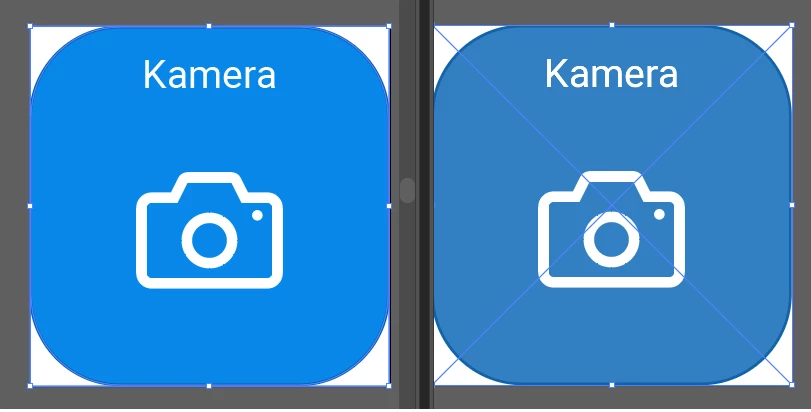
My Adobe illustrator keeps changing the colors of images that I link. Both profiles are set to RGB so that should not be a problem. 

The left image is the original, the right one is the file with the link.
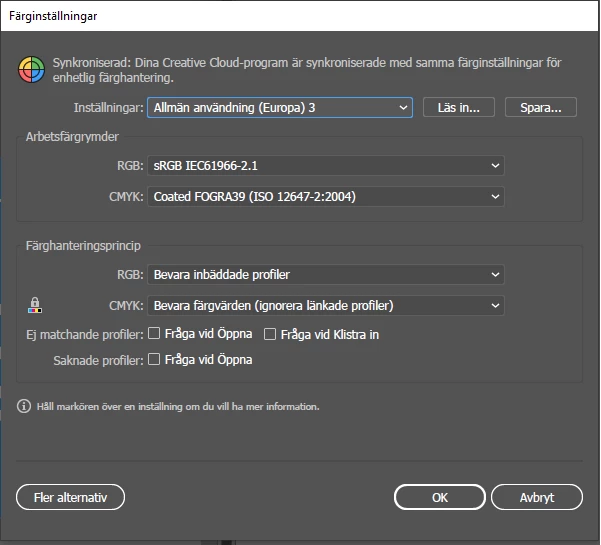
 These are my color settings (sorry for the Swedish, I cannot change the language of Adobe)
 Any ideas of how to fix this?

This topic has been closed for replies.
Correct answer Ton Frederiks

Marlous, I think I found the cause of the color shift. 

There is an option in the EPS Options "Include CMYK PostScript in RGB Files" when checked it causes the color shift.

Turn it off an the RGB preview is there when the .eps file is placed.

3 replies

Vinsonitus
Participant
February 27, 2024

"EPS Options "Include CMYK PostScript in RGB Files" when checked"

After almost 30 years of using Adobe, I still run into this issue. Why this is enabled by default is amazing, because most people dont seem to use it and spend HOURS trying to solve it. The option alludes almost everyone.

Monika Gause
Community Expert
Community Expert
February 27, 2024

I hope that not a lot of people use EPS anyway.


If you want to file a bug report/feature request, please use: https://illustrator.uservoice.com 

Ton Frederiks
Community Expert
Ton FrederiksCommunity ExpertCorrect answer
Community Expert
May 25, 2023

Marlous, I think I found the cause of the color shift. 

There is an option in the EPS Options "Include CMYK PostScript in RGB Files" when checked it causes the color shift.

Turn it off an the RGB preview is there when the .eps file is placed.

MarlousHAuthor
Participating Frequently
June 7, 2023

Cool, thank you for looking into this once more! Works a charm 🙂

Ton Frederiks
Community Expert
Community Expert
April 17, 2023

Is your Document Color Mode perhaps CMYK (File > Document Color Mode > )?

What is your  Document Color Profile? See Edit > Assign Profile...

What filetype are those images, do they have a profile?

MarlousHAuthor
Participating Frequently
April 17, 2023

Like I said in my original post, both files are RGB so that should not cause a problem. They are both .eps files. I also posted an image of the color profile settings.

Jacob Bugge
Community Expert
Community Expert
April 17, 2023

Marlous,


What happens if you place the image (linked) in a new AI document?