PositiveGreenArtStudio
Participant
January 11, 2018
Answered

adobe illustrator cs2 color picker error(please help)

  • January 11, 2018
  • 1 reply
  • 420 views

recently I noticed that when I try to access the color panel the panel is blank and theres no way to exit the panel. I always have to exit the entire program. I cant seem to fix this issue. illustrator is basically useless for me until I fix this. see the screenshot to see what I'm talking about. does anyone know how to fix this?
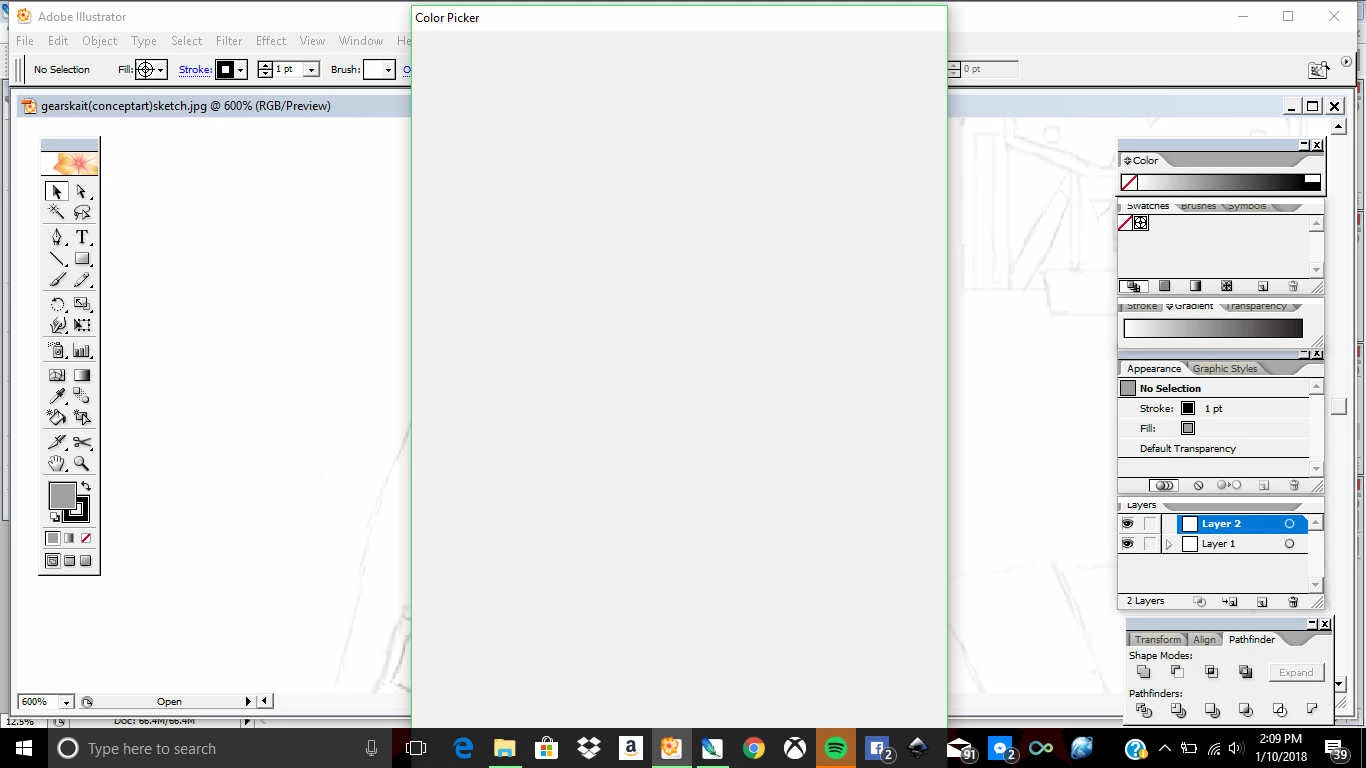
This topic has been closed for replies.
Correct answer Bill Silbert

If you are using Windows 10 then unfortunately the problem is that recent automatic updates to Windows 10 has resulted in this situation for many. I have not seen any real fix for this issue which, in effect, makes pre-CC versions of Illustrator unusable. Microsoft has announced that all future versions of Windows will be known as Windows 10 regardless of how changed they are from the original version. So it will become even harder to use older software on Windows. It appears that the only recourse you have is either to install Windows 7 or 8.1 on your machine or update your software which means getting a subscription to Creative Cloud.

1 reply

Bill Silbert
Community Expert
Bill SilbertCommunity ExpertCorrect answer
Community Expert
January 11, 2018

If you are using Windows 10 then unfortunately the problem is that recent automatic updates to Windows 10 has resulted in this situation for many. I have not seen any real fix for this issue which, in effect, makes pre-CC versions of Illustrator unusable. Microsoft has announced that all future versions of Windows will be known as Windows 10 regardless of how changed they are from the original version. So it will become even harder to use older software on Windows. It appears that the only recourse you have is either to install Windows 7 or 8.1 on your machine or update your software which means getting a subscription to Creative Cloud.