josephb45815375
Participant
January 17, 2017
Answered

Adobe Illustrator CS5.1------How to flip house blueprint with text?

  • January 17, 2017
  • 4 replies
  • 745 views

HEY THERE!

IM LOOKING FOR AWAY TO FLIP A BLUEPRINT OF A HOUSE WITH THE TEXT AND DIMENSIONS? IS THERE A SIMPLE WAY OF DOING THIS?  THANKS

    This topic has been closed for replies.
    Correct answer barbara_a7746676

    Assuming you want a horizontal flip (rather than vertical):

    In the Transform panel, flip horizontal.

    Select all of the pieces of text.

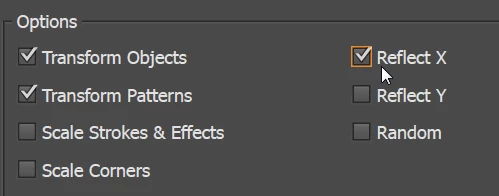
    Choose Object > Transform > Transform Each. At the bottom of the panel, under Options, choose Reflect X.
    4 replies

    josephb45815375
    Participant
    January 17, 2017

    THANK YOU ALL FOR THE HELP.... JOE

    barbara_a7746676
    Community Expert
    barbara_a7746676Community ExpertCorrect answer
    Community Expert
    January 17, 2017

    Assuming you want a horizontal flip (rather than vertical):

    In the Transform panel, flip horizontal.

    Select all of the pieces of text.

    Choose Object > Transform > Transform Each. At the bottom of the panel, under Options, choose Reflect X.

    josephb45815375
    Participant
    January 17, 2017

    THANK YOU

    Jacob Bugge
    Community Expert
    Community Expert
    January 17, 2017

    Joseph,

    As I (mis)understand it, you may try to:

    1) Select everything and Object>Transform>Reflect Vertical;

    2) Select all Type/text bits and Object>Transform>Transfor Each>Reflect X.

    Monika Gause
    Community Expert
    Community Expert
    January 17, 2017

    Please show a screenshot.

    Also: there's no need to shout. Text can be read better if it's not in All-Caps