
Adobe Illustrator GPU issue
Hi there
I am assisting a client of ours with a GPU error that is being received whilst he is in Illustrator. He is one of the marketing designers for the company.
The device specifications are:
Dell Pro Max 16
Intel(R) Core(TM) Ultra 7 265H
64GB of ram
Intel(R) Arc(TM) Pro 140T GPU (32GB)
NVIDIA RTX PRO 1000 Blackwell Generation Laptop GPU
Whilst using Illustrator he repeatedly receives the following error message,
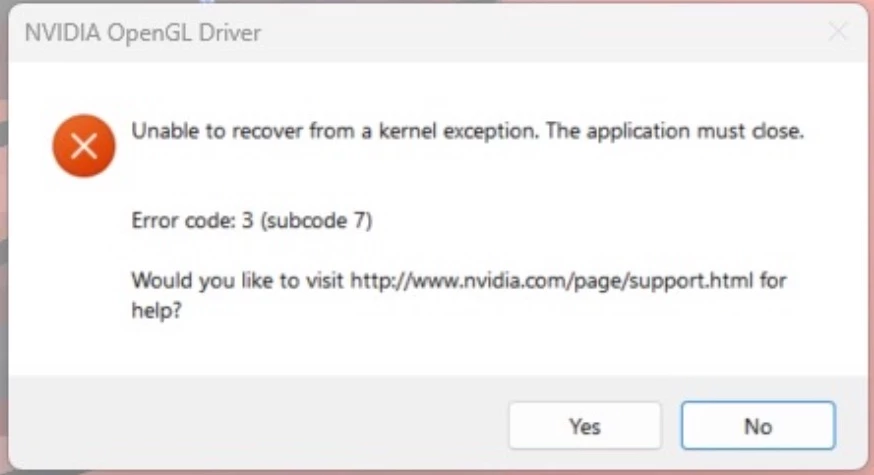
I have gone through the forum and tried all applicable fixes including
Setting the application settings within the Nvidia panel to use the high performance GPU.
Updated the Intel Iris drivers.
Updated the Nvidia drivers.
Uninstalled and reinstalled Adobe Creative Cloud. (Used Revo uninstaller to ensure a clean removal).
Attempted the registry fixes.
None of them worked, The GPU is also not visible within the Adobe settings as per below,
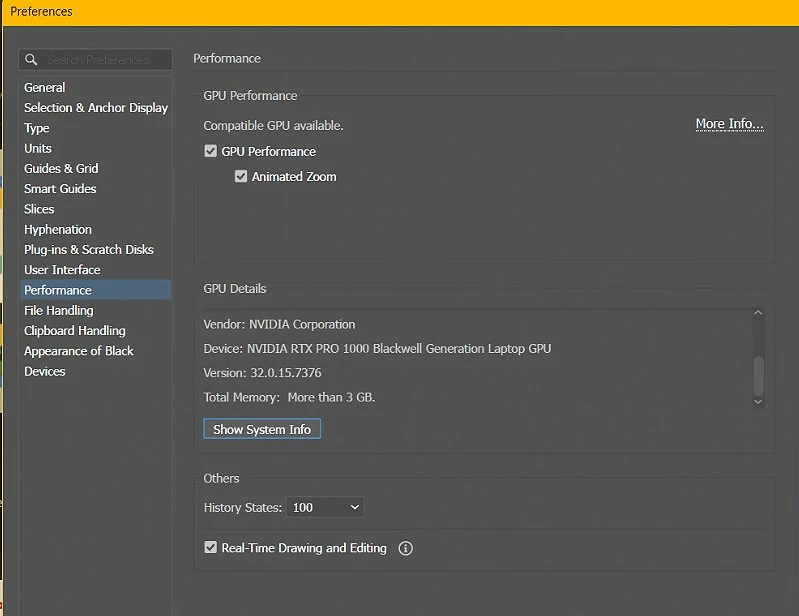
I am unsure as to how to resolve this issue as it is a brand new device.
Any advice will be appreciated.
 AdChoices