Levz
Participant
April 11, 2024
Question

Adobe Illustrator Keep On Crashing

  • April 11, 2024
  • 2 replies
  • 3400 views

Help I cant use my illustrator because it keeps on crashing! I already updated the app, tried the old versions and did the clean uninstall but still no luck. It allows me to create a new file or open a file then it will hang then it'll close.

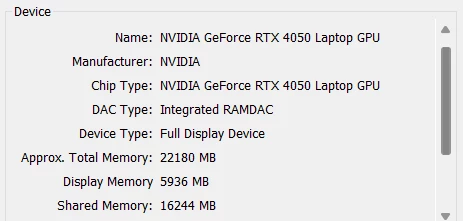
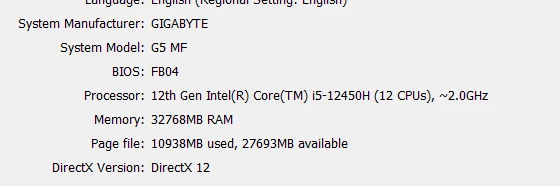
Here is my computer specs. 


This topic has been closed for replies.

2 replies

Mike_Gondek10189183
Community Expert
Community Expert
April 15, 2024

By clean install did you use the Creative Cloud Cleaner to fully remove your app & prefs then reinstall.


If this is happening in multiple versions of Illustrator you might have something wrong with your cloud app, or some other offending app is running on your computer. Did this work in the past, was any new software installed?


Set PDF as a default printer. Ilustrator likes to have a printer set or will crash.


Lastly if needed


OOBE RESET WIN

Quit the Creative Cloud desktop app  (100% you must do this)

C:\Users\<user folder>\AppData\Local\Adobe\OOBE 

The AppData folder is hidden in Windows by default. See Show hidden files, folders, filename extensions | Windows for instructions to access it.

Delete all the files within the OOBE folder, but do not delete the folder itself.

Restart the computer and launch the Creative Cloud desktop app again.


Levz
LevzAuthor
Participant
April 20, 2024

Hi, Mike. It only happens to my laptop. I already reformat my device and still the problem persists. I don't have a printer so I don't think that is the problem. But I'm going to try it. I'll give you an update. 

Monika Gause
Community Expert
Community Expert
April 11, 2024

So it's crashing when you open a file?

Check your printer. Is a default printer set up? Is that printer turned on?

Anubhav M
Community Manager
Community Manager
April 11, 2024

Hello @Levz,

We understand how frustrating it can be to encounter crashes in the middle of work. Would you mind trying the suggestions shared in this help article (https://adobe.ly/3xxMihg) and checking if they help? Also, kindly submit the crash report using your Adobe email address and share it here for quick tracking. Steps are shared here: (https://adobe.ly/3xxVn9S). We appreciate your time and patience in helping us resolve this issue.

Looking forward to hearing from you.


Thanks,

Anubhav

Levz
LevzAuthor
Participant
April 20, 2024

The crash report pop-up doesn't show when the app crashes.