
Inspiring
June 1, 2020
Answered

Adobe Illustrator Perspective

  • June 1, 2020
  • 4 replies
  • 4707 views

Hi, I am trying to match a vector graphics object with a background photo.

Trying just to move the corners around and warp it (with mesh) but it does not work.

What am I doing wrong?

There is a perspective warp in Photoshop, but I want to do the same with a vector object for better graphics quality.


Regards
This topic has been closed for replies.
Correct answer emosms

Yes, you could do that. Select the artboard tool and move it.


Thx :). Moved the ardboard on top of the working area and extended the nadir vanish point to the bottom. But still off...... Mby have to adjust the image itself (skew, distort, transform)

https://ibb.co/FkQszVX


4 replies

emosmsAuthor
Inspiring
June 3, 2020

Maked it work, with free transform, but...
Now it does not work like before...
Instead of grips on the corners of my shape, I get some extra frame around my object, with its own grips.

A total waste of time trying to match it like this.... ;(
https://imgur.com/pCrjKwd

Monika Gause
Community Expert
Community Expert
June 3, 2020

Which version?

Please do always show the layers panel when showing screenshots.

emosmsAuthor
Inspiring
June 4, 2020

Hi, it is AI 20.1.0 64 bit, 2015.

Now I am trying the same with imported image (free transform).
But after I move the grip, the raster object goes back to its original shape. Refuses to distort 😞

https://ibb.co/6vrh2mD

emosmsAuthor
Inspiring
June 1, 2020

I found it - free transform. 
But as an autocad user, i find graphics design programs A TOTAL CRAP and counterintuitive.


Everything obscure and not straightforward.

Now I just want to make a selection and apply color, trying with clipping masks and all my vectors just dissapear.

It is drawn in autocad of course, cannot do such a harm to myself drawing in AI.

Just wanted to apply warp on top of a photo and paint a selection...

Legend
June 1, 2020

Free Transform is a basic tool that just does a plain transform but with no perspective or depth projection at all. Please try the perspective Grid tool and compare. thanks.

emosmsAuthor
Inspiring
June 2, 2020

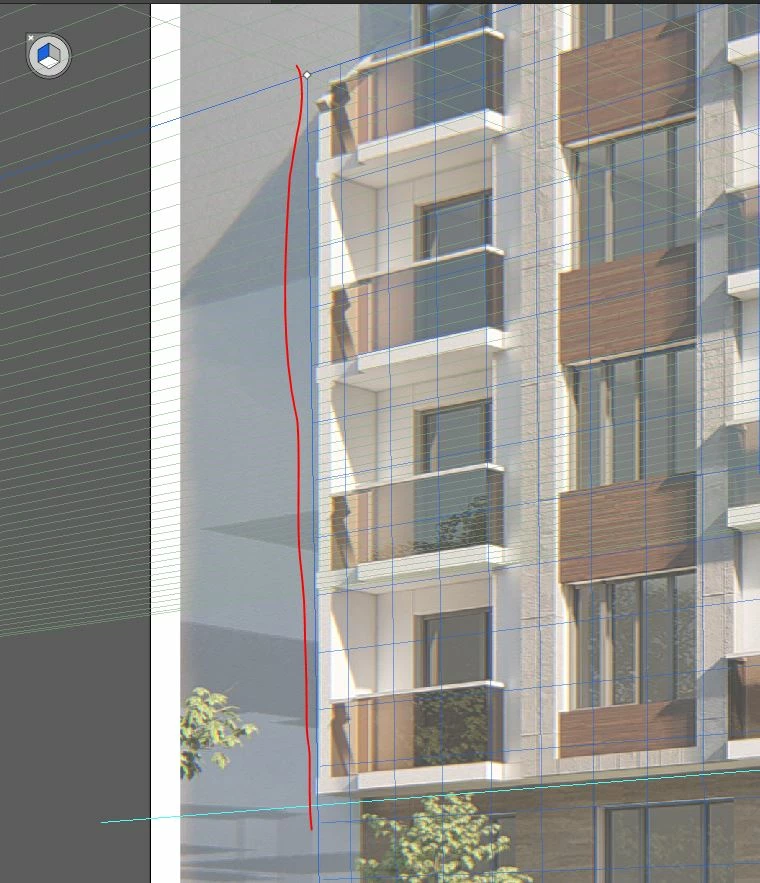
Thanks. Free transform is partly ok, cause I see straight lines on the picture to match shapes to it.

I also applied perspective grid to finely adjust objects (need more vertical lines according to the perspective).

But, the vertical plane grids are not ok.

The Left vertical plane's grid is completely missing.
The Right vertical plane has some grid, but I cannot extend it to the end of the workspace.

(photo attached - https://ibb.co/PccXP0N )

Legend
June 1, 2020

If the picture shows a perspective, you can use the Perspective Grid Tool to match the one on the picture and then add your vector object (rather a copy of it) onto that grid using the Perspective Selection Tool.

Mylenium
Legend
June 1, 2020

Without seing your photo and your artwork nobody can advise specifically. chances are you are completely ignoring the fact that real lenses have curvature and photos may expose additional other behaviors based on depth, so naturally a simple corner pin warp might not at all look realistic. Additional steps may be required.


Mylenium