
Participant
October 19, 2023
Answered

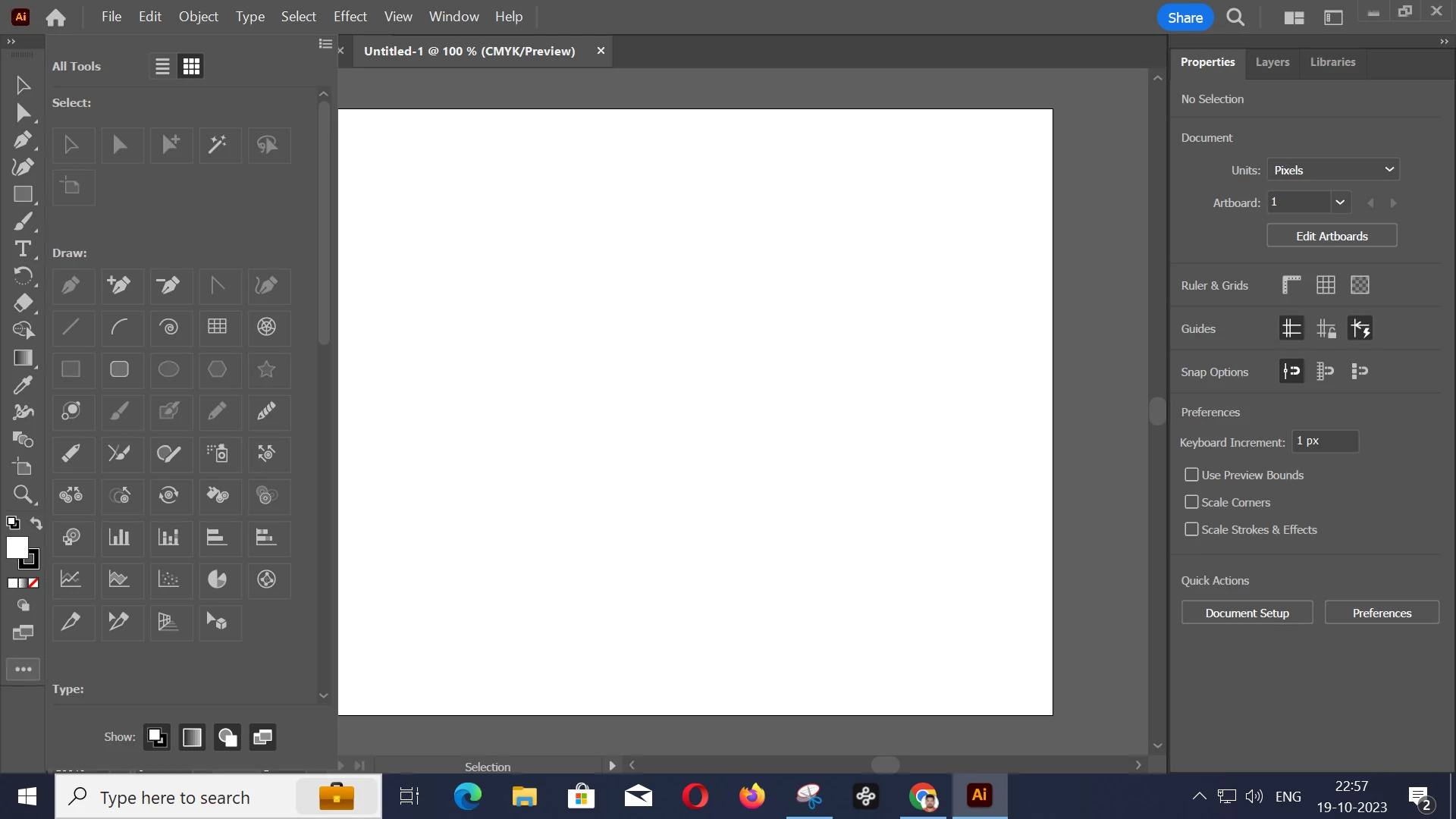
Adobe Illustrator toolbar icons are disabled.

  • October 19, 2023
  • 1 reply
  • 317 views

Hi,


I am using Adobe Illustrator for my company's purposes, and upon checking the toolbar, I noticed that the icons are in a disabled state. Is this due to pricing or some other issue?


I have attached an image for the reference. 


Thanks

Anu Kumar

Senior Graphic Designer
www.nexinfo.com

This topic has been closed for replies.
Correct answer Monika Gause

Just select Window > Toolbars > Advanced and then please read the documentation about how to configure the toolbar.


https://helpx.adobe.com/illustrator/using/tools.html 

1 reply

Monika Gause
Community Expert
Monika GauseCommunity ExpertCorrect answer
Community Expert
October 19, 2023

Just select Window > Toolbars > Advanced and then please read the documentation about how to configure the toolbar.


https://helpx.adobe.com/illustrator/using/tools.html 

AnukumarAuthor
Participant
October 27, 2023

Hi


I have changed from Basic to advanced. Now it is working well. Thank you