
Participant
March 28, 2019
Question

Advanced tools greyed out and not available in Illustrator CC 2019

  • March 28, 2019
  • 2 replies
  • 41975 views

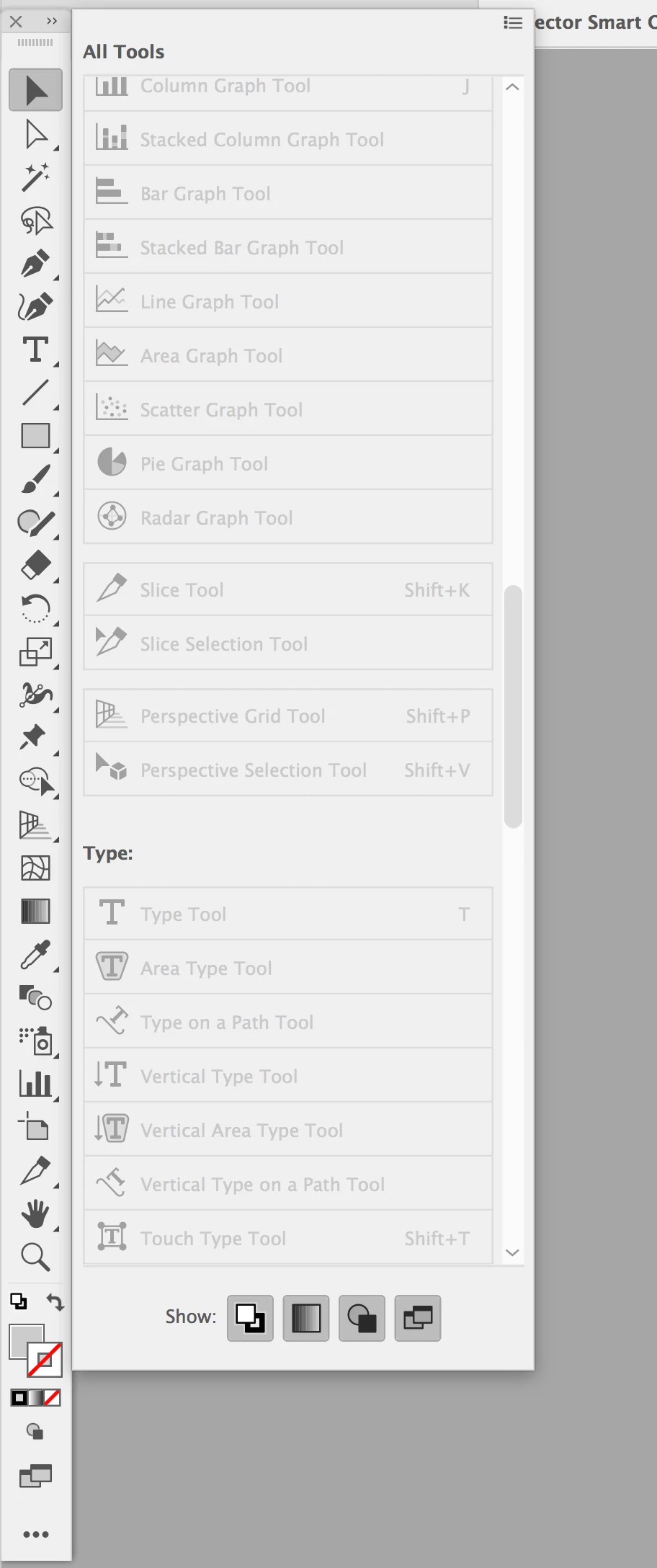
I recently updated my Illustrator CC 2019, and can't use any Advanced Tools. All of the tools in the fly-out are greyed out, and I can't click/access any of them. See screenshot. I tried uninstalling and reinstalling Illustrator CC 2019, but to no avail. Any suggestions?
    2 replies

    JSTN
    Participant
    April 23, 2020

    Hi

    I had this problem just now with the latest update for 2020 - everything was greyed out in the addiotnal toolbars,  i managed to get round it by chosing basic and then back to advanced again, then i dragged the one i wanted into the toolbar

    it was all fine the other day, not sure what the update did to change anything but hope this helps 

    Participant
    July 23, 2020

    Same situation.  Switched to basic and the pencil tool became available.


    Participant
    December 10, 2020

    did not work for me

    Monika Gause
    Community Expert
    Community Expert
    March 28, 2019

    This means that the tools are already contained in your current toolbar setup. They are just hidden below other tools. Press and hold those tools and you will see a popup with the other tools. Documentation: How to work with tools in Illustrator

    Hello my name is
    Participant
    October 16, 2020

    That did not work. 

    Inspiring
    December 10, 2020

    Try going into window and then select advanced toolbar.