
Inspiring
October 27, 2024
Answered

After cut and paste the object can not be removed

  • October 27, 2024
  • 2 replies
  • 415 views
The following scenario gave me an error. What is wrong?
 
1. create new layer // it becames a current layer
2. draw point (ellipse). // obj ref is `point`
3. cut & paste
4. deselect all
and 
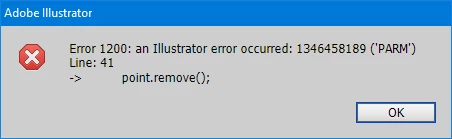
point.selected = true;
point.remove();
 
This topic has been closed for replies.
Correct answer andyf65867865

In this scenario, I managed to delete this point by setting a note for it and then finding it by searching among pageItems. 

Nevertheless, it is also interesting to know other solutions.

2 replies

andyf65867865AuthorCorrect answer
Inspiring
October 28, 2024

In this scenario, I managed to delete this point by setting a note for it and then finding it by searching among pageItems. 

Nevertheless, it is also interesting to know other solutions.

Charu Rajput
Community Expert
Community Expert
October 27, 2024

@andyf65867865 - Could you please share code what exactly you are processing. Tried the following snippet based on your steps and it works well


var _doc = app.activeDocument;
var _layer = _doc.layers.add();
var _point = _doc.pathItems.ellipse(0, 0, 30, 30);
app.executeMenuCommand('cut');
app.executeMenuCommand('paste');
app.executeMenuCommand('deselectall');
_point.selected = true;
_point.remove();


Best regards
Inspiring
October 27, 2024

Hi @Charu Rajput, please try this. 


(function() {
    var doc = app.activeDocument;
    var newLayer = doc.layers.add();

    var point = doc.pathItems.ellipse(0, 0, 1, 1);
    point.filled = true;
    var whiteColor = new CMYKColor();
    whiteColor.cyan = 0;
    whiteColor.magenta = 0;
    whiteColor.yellow = 0;
    whiteColor.black = 0;
    point.fillColor = whiteColor;
    point.stroked = false;

    app.executeMenuCommand('Find Fill Color menu item');
    app.executeMenuCommand('cut');
    app.executeMenuCommand('pasteFront');
    app.executeMenuCommand('deselectall');

    point.selected = true;
    point.remove();
})();


It seems that it is the 'Find Fill Color menu item' followed by cut & paste that is causing this error.