
Participant
September 3, 2021
Answered

After Outlining the Text, the Text box color get filed with a solid color in Illustrator

  • September 3, 2021
  • 1 reply
  • 2516 views

Hi,

I accidentally meet with an issue when i outlined the paragraph text it got filled with solid colored, i'm not able to figured out exactly what happened below is the screenshot of the same.
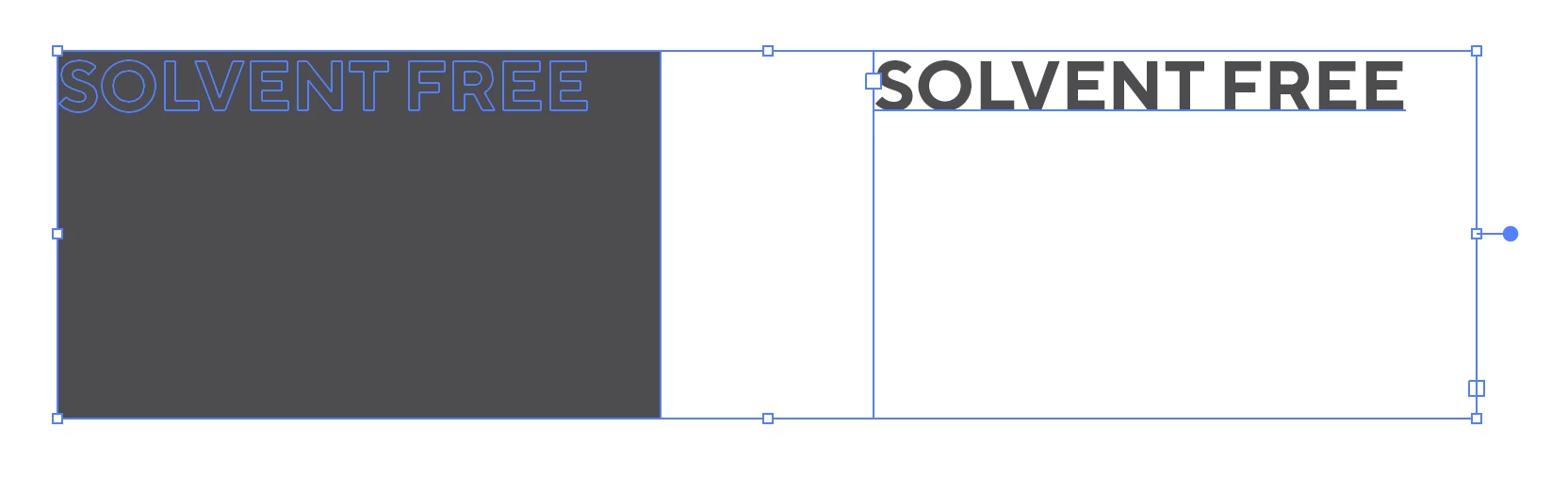


{Renamed by MOD}

This topic has been closed for replies.
Correct answer Ton Frederiks

Does this happen in other documents too?

When the contour of the textbox is selected with the Direct Selection tool you can see that is has a fill.

Somehow you cannot see the fill, but it becomes visible when you create outlines.

If you remove the fill before creatiing outlines it behaves as expected.

1 reply

Anshul_Saini
Community Manager
Community Manager
September 3, 2021

Hi there,


Sorry about the trouble. I am unable to replicate this issue at my end. Could you please share a few more details like:

  • OS and version of Illustrator
  • Is the issue related to a specific document? Could you please share a sample document with us? You can upload it to the Creative Cloud (https://helpx.adobe.com/in/creative-cloud/help/share.html) and share the download link.
  • Are there any recent changes made to your system? For example, any antivirus, system updates, or web extensions installed recently.
  • A small video demonstrating the issue could be really helpful.
  • Does resetting Illustrator Preferences ( https://helpx.adobe.com/illustrator/using/setting-preferences.html) help to resolve the issue?
    Disclaimer: Please note that resetting preferences will remove all the custom settings, and Illustrator will launch with default settings. You can also take a backup of the folders in case you want to. Location is mentioned in the article.


I will be looking forward to hearing from you.


Thanks & Regards,

Anshul Saini

Dilip5FBCAuthor
Participant
September 6, 2021

Hi..


I encountered this issue working with the particular document below is the link of the same

LINK: https://shared-assets.adobe.com/link/f72471a4-88b8-40d0-4520-664beaf0d912

OS VERSION: Mircrosoft Windows 21H1  (OS Build 19043.1165)

ILLUSTRATOR VERSION: 25.4.1 (64 bit)  

There is no recent change with system it is working fine, i just need to identify exactly what happened with the parapraph text that when converted to outline it totally goes filled with the selected color in the text.


Also please find enclosed video for your reference.


Thanks & Regards,

Dilip Chauhan

Ton Frederiks
Community Expert
Ton FrederiksCommunity ExpertCorrect answer
Community Expert
September 6, 2021

Does this happen in other documents too?

When the contour of the textbox is selected with the Direct Selection tool you can see that is has a fill.

Somehow you cannot see the fill, but it becomes visible when you create outlines.

If you remove the fill before creatiing outlines it behaves as expected.