Known Participant
June 2, 2018
Answered

Agrandir une image en conservant les proportions

  • June 2, 2018
  • 4 replies
  • 2549 views

Salut à tous,

J'utilise AI que depuis quelques mois et je voudrais savoir comment on fait pour agrandir une image sans que celle-ci se déforme...
(Sur les 2 images ci-dessous on voit que lorsque j'agrandi cette forme arrondi, elle devient un rectangle...)

Pouvez-vous m'aiguiller s'il vous plaît???

Merci d'avance

    This topic is closed to new replies. Start a new post to keep the conversation going.
    Correct answer Anna Lander

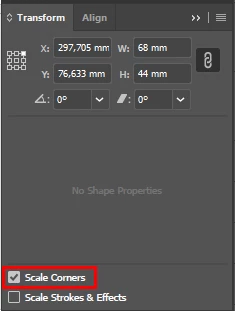
    dans la palette Transform, activez l'option Ajuster les angles (Scale Corners)

    4 replies

    Anna Lander
    Anna LanderCorrect answer
    Inspiring
    June 3, 2018

    dans la palette Transform, activez l'option Ajuster les angles (Scale Corners)

    N_TonyAuthor
    Known Participant
    June 3, 2018

    Super, merci!

    Bill Silbert
    Community Expert
    Community Expert
    June 2, 2018

    How did you go about enlarging the object? In Illustrator if you have the option to "Show Bounding Box" activated (it is under the View Menu) then you simply have to select the object with the regular selection tool (the black arrow) and pull on one of the corner handles while holding down the shift key and you will see your object enlarging proportionally.

    N_TonyAuthor
    Known Participant
    June 3, 2018

    Merci