
dwspiv
Known Participant
January 20, 2023
Question

AI 2023 v27.2 embedded grayscale image assigned a PMS color is printing as negative of image

  • January 20, 2023
  • 3 replies
  • 2055 views

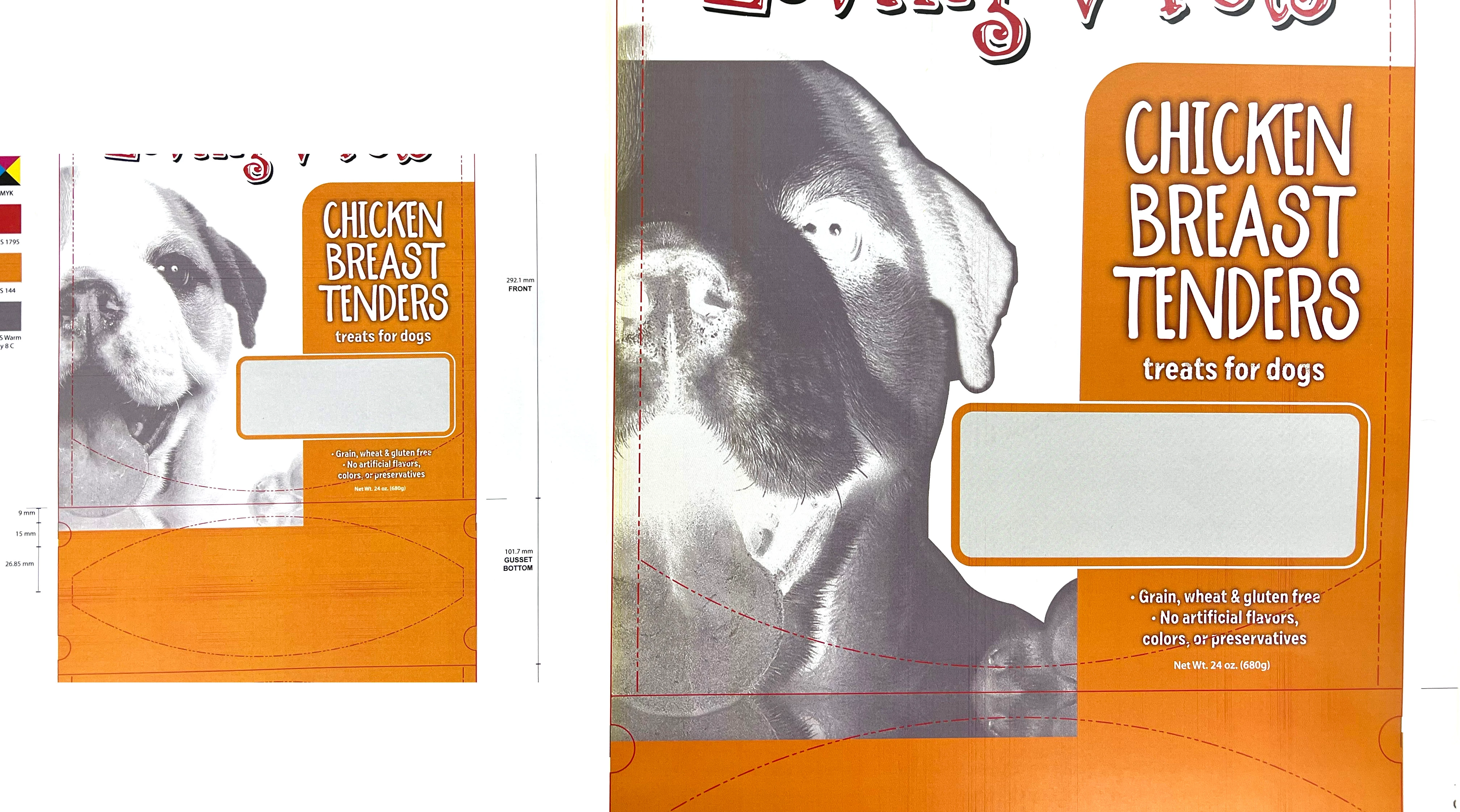
I have a package design where I have a masked grayscale image that I assigned a PMS gray color to. When printing to full size on a tabloid extra page on Xerox C70 with Fiery, the image prints as a negative! Actually only portions of the image. Where it aligns with some elements, it prints correctly. When assigned CMYK gray, it prints correctly.  I tried troubleshooting by 1) removing other elements that align with the region that is printing improperly. It helped only when I removed everything else that aligned horizontally. 2) I then redrew the mask to form fit the image so that the item no longer had to rest underneath elements, but instead could be the top layer. It did not help. 3) I then, to save toner and paper, chose to print at 50% to letter size paper, and removed all other elements and slowly added the elements back in. At 50% it ALWAYS printed properly! 4) I then tried printing the complete file at 75% to letter size. and the file went back to printing the image in negative.  5) I then tried to save the file as a PDF, and then print at 100%. That did not help.  6) My only things that I have not tried yet are A) Try placing the image instead of embedding.  B) Try an autotrace and hope it maintains tints of the PMS color.  
FYI, this happened also prior to the latest update, so that is NOT the issue. CAN anybody help here? I am at a loss other than trying those 2 other things. This is sooo strange.  Photo with my iphone below.
This topic has been closed for replies.

3 replies

Mike_Gondek10189183
Community Expert
Community Expert
January 29, 2023

Can we see a screenshot of your photoshop layers & channels? If your CMYK layer is transparent, add a fil of white pixels, this often helps the spot color separation print correctly as composite out of Illustrator.

dwspiv
dwspivAuthor
Known Participant
January 29, 2023

The image is embedded in Illustrator, not placed from a Photoshop file  – which flattens the file unless I choose to apply masking or transparency, which I did not.

The image is GRAYSCALE also, which is what is needed to apply a PMS color to it. So I think this is moot.


David Spivak

dwspiv
dwspivAuthor
Known Participant
January 29, 2023

This problem is still UNRESOLVED. I shared the file as requested. See this thread.

Anubhav M
Community Manager
Community Manager
January 31, 2023

Hello @dwspiv,


Thanks for sharing the details and the file. Kindly allow us some time while I check this with the team.


Regards

Anubhav M
Community Manager
Community Manager
January 24, 2023

Hello @dwspiv,


Thanks for reaching out. Would you mind trying to export the file from Illustrator as a JPEG and then printing it to check if it helps?

If the issue persists, kindly share a sample file (https://community.adobe.com/t5/illustrator-discussions/share-your-files-in-6-simple-steps/td-p/12967531) so that we can check it on our end.


Looking forward to your response.


Thanks,

Anubhav

dwspiv
dwspivAuthor
Known Participant
January 24, 2023

Exporting as a jpg defeats the purpose of setting it up that way to begin with. It is assigned a PMS color for proper color separations from within Adobe Illustrator. I Will share the file later today.