
Legend
January 9, 2026
Answered

AI 30.0 - Resizing artboards scales artwork - Turn it off?

  • January 9, 2026
  • 2 replies
  • 124 views

New Illustrator 30.0 now scales artwork when the artboard gets re-sized.


I never gave Adobe permission to add this annoying feature. 🙂


How does one turn this off? So that I can resize artboards like the old days with it scaling my artwork.



Correct answer Tina_Irvine

HI @SundayGladiator

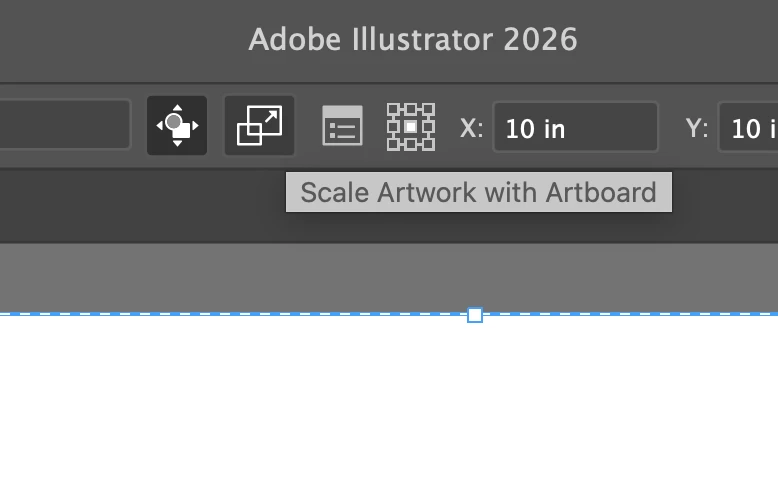
When you're in the artboard tool, there's a button at the top. Click on it to toggle it on / off.


Screenshot 2026-01-09 at 2.24.32 PM.png

2 replies

Ton Frederiks
Community Expert
Community Expert
January 9, 2026

And there is another place where you can change this, the Properties panel; "Scale artwork with Artboard" but not where you also would expect it in the Artboard Options.

Screenshot 2026-01-09 at 20.55.58.png

Tina_Irvine
Community Expert
Tina_IrvineCommunity ExpertCorrect answer
Community Expert
January 9, 2026

HI @SundayGladiator

When you're in the artboard tool, there's a button at the top. Click on it to toggle it on / off.


Screenshot 2026-01-09 at 2.24.32 PM.png

Legend
January 9, 2026

Thank you !!