
Participant
September 16, 2024
Question

AI freezes and my preferences says compatible GPU not available

  • September 16, 2024
  • 1 reply
  • 158 views

Not sure what to do. It was working fine but I have added a lot of elements to a pattern and it spins for a long time each time I click on anything.

when I bought it a year ago it said my system was compatible. Perhaps it really isnt?

This is my system. 
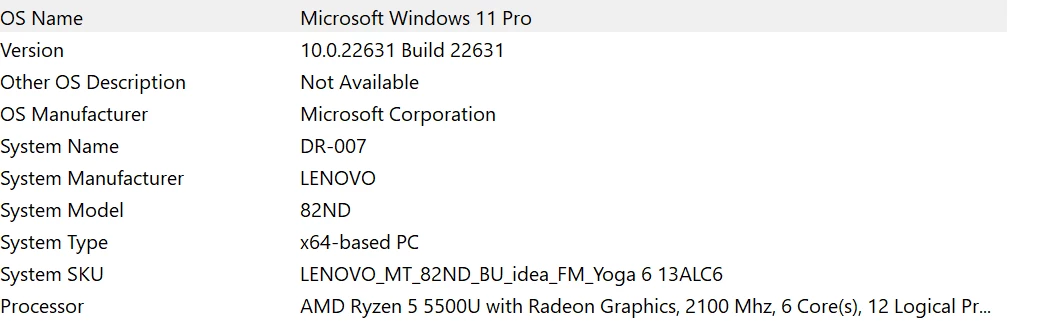


Does it not meet requirements of Adobe Illustrator?
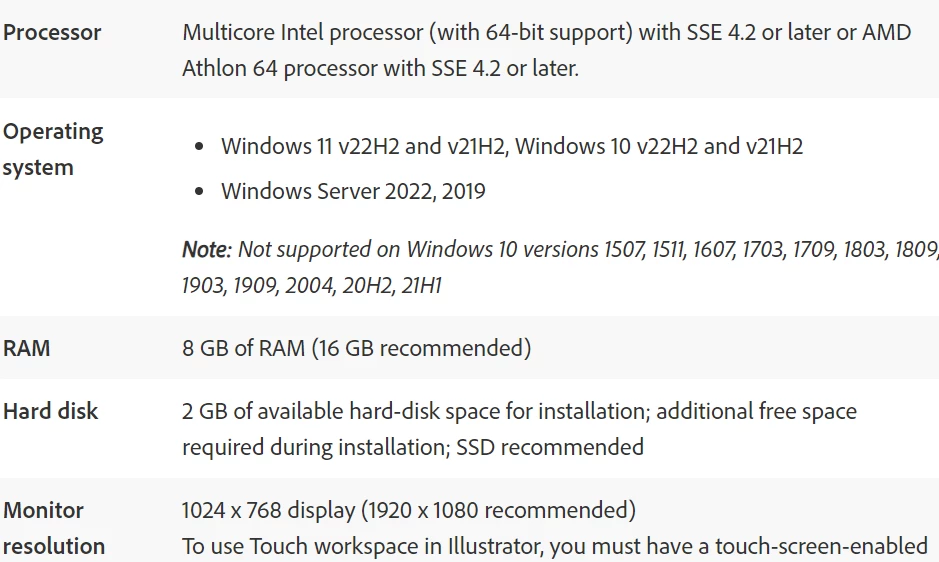


Thanks
This topic has been closed for replies.

1 reply

Anubhav M
Community Manager
Community Manager
September 17, 2024

Hello @Kelly3448219936bl,

I am sorry to hear about your experience. I hope the suggestions shared earlier helped resolve the problem. If not, we'd need some more information to be able to help you with this scenario:


1. AiSniffer file:

- Close all Adobe applications.

- Navigate to the Illustrator Preferences folder and copy the AiSniffer file to the desktop from this location: 

C:\Users\%USERPROFILE%\AppData\Roaming\Adobe\Adobe Illustrator 27 Settings\en_US\x64


2. For the System Report, kindly follow these steps:

- Please press Windows Key + the letter "R" on your keyboard to bring up the Run command window

- Type "msinfo32" in the Open field and left-click OK

- While viewing the Microsoft System Information summary, go to File, then choose Save (Please do not use Export)

- Save your MSINFO32 report as "msinfo32.nfo" on your desktop to easily locate it after. It can take up to a minute to generate a report.


Kindly upload the files to Google Drive/Dropbox/etc. and share a public link here or via DM so that we can investigate this further.


Looking forward to hearing from you.


Thanks,

Anubhav

Participant
October 6, 2024

To be honest, all of those terms were unfamiliar by I did determine that I didn't have enough ram.  My laptop wasn't expandable so I got an iPad Pro but don't believe i can create a swatch so will probably return it.