deanm58695321
Participant
October 21, 2019
Question

AI Missing fonts

  • October 21, 2019
  • 2 replies
  • 585 views

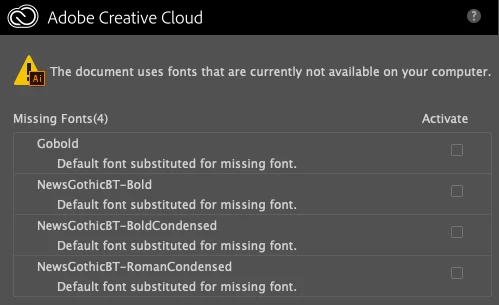
When I’m opening AI files, there is a problem of Missing Fonts comes up. I tried to search and download those fonts at fonts.adobe.com; however, it says that there are no such fonts (please see the screenshot). Can you please advise how I can fix it?
    This topic has been closed for replies.

    2 replies

    Sebastian Bleak
    Community Expert
    Community Expert
    October 22, 2019

    You can ask the creator of the document to provide you with those fonts and then install them on to your machine. If they're not sure how to do it, they can open the file in Ai, go to the File menu at the top and choose Package. Have them send you the folder and you should have everything you need. 

    Ton Frederiks
    Community Expert
    Community Expert
    October 22, 2019

    "You can ask the creator of the document to provide you with those fonts"

    If you don't own the fonts you are not allowed to use them.

    There is a big warning when packaging the file:

    deanm58695321
    Participant
    October 22, 2019

    Thank you very much!!!

    Ton Frederiks
    Community Expert
    Community Expert
    October 21, 2019

    Either search for a place where you can buy them or replace them by another font: Type > Find Font...