Inspiring
July 30, 2022
Answered

AI Object attribute/ method tips in VS Code

Hello,


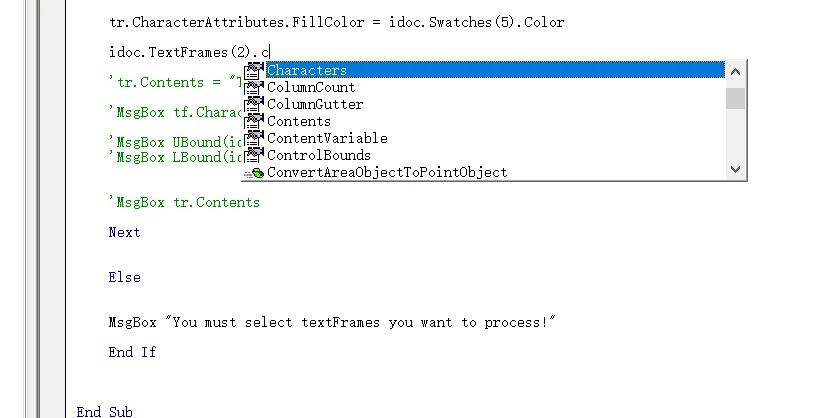
I am a novice in illustrator script. Now I try to write JS with VS Code, but the properties and methods of AI objects are very troublesome to me. How can I have property and method prompts when writing JS with VS Code? It's like writing VBA in VBE.


Any other suggestions, I am very grateful!


Object attribute/ method tips in VBE

This topic is closed to new replies. Start a new post to keep the conversation going.
Manan JoshiCorrect answer
Community Expert
August 1, 2022

Hi @Manan Joshi 

I watched this video several times, but I still didn't understand it. I'm very ashamed and confused, but thank you!

I don't know where to start first.....


  • Open the terminal application your MAC. It is an application that is used to run commands, you might have used it. You can open it by typing terminal in Spotlight

After you open the terminal you run the following commands as mentioned in the Github repo. One after the other. The lines starting with # are just comments to tell you what is being done by the commands that follow, so they need to be ignored. Copy them and paste in terminal one by one and press enter.

# create new folder
mkdir my-script
cd my-script

# install types-for-adobe
npm init -y
npm i types-for-adobe

# create tsconfig.json
printf '{"compilerOptions":{"module":"none","noLib":true}}' > tsconfig.json

# create index.ts and change reference types to Adobe product you're targeting
printf '/// <reference types="types-for-adobe/Illustrator/2015.3"/>\nalert(String(app));\n' > index.ts

# compile typescript files
tsc

# open Adobe Illustrator -> File -> Scripts -> Other Script -> and open index.js

Let me know if you still have issues.

 -Manan

-Manan

7 replies

Community Expert
July 30, 2022

Hi @Raymond ZJH,

Checkout this project

https://github.com/aenhancers/Types-for-Adobe

Also, if you choose not to write TS but regular js, these type definitions are reported to still work as per the discussion mentioned below

https://community.adobe.com/t5/illustrator-discussions/jsdoc-for-illustrator-vscode/m-p/11831850

-Manan

Translate
-Manan
Inspiring
July 30, 2022

Hi @Manan Joshi 

First of all, thank you for your quick reply!

It seems that this is a very complicated thing. I can't understand it at all, and I don't know how to download this index.d.ts file and open it in vs code. I'm not a professional programmer. I only write some JS at ordinary times. I don't know whether there are simple steps 1, 2 and 3.... to realize this function?

Translate
Community Expert
July 30, 2022

Did you see the video on the github link? That shows the steps you need to take. Also the commands under Your first script for eg. Adobe Illustrator lists all the commands that you need to execute in order to set things up.

-Manan

Translate
-Manan