Inspiring
September 3, 2023
Answered

AI to svg export error

  • September 3, 2023
  • 1 reply
  • 4552 views


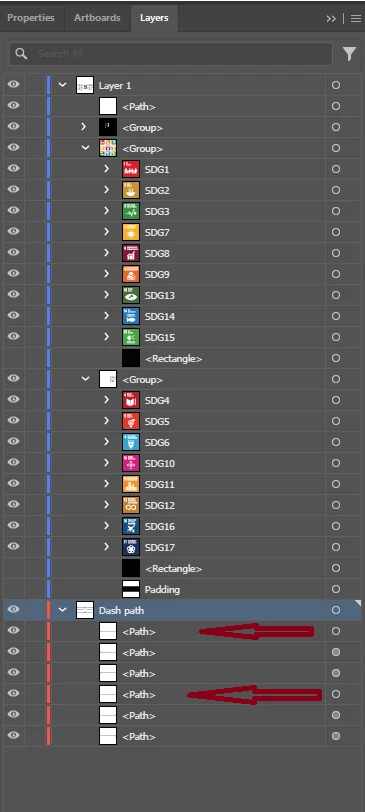
I am attaching an image of the layer panel in the hope that someone can help me correct the error which consists of an error displaying the exported svg file.
Items indicated by arrows (dashed lines) are not visible.


Unfortunately I'm not an expert user. Consider this when providing guidance.


Regards


This topic has been closed for replies.
Correct answer Monika Gause

Sorry, I corrected the link. Try now: https://drive.google.com/drive/folders/1kMJ5S3By4jqygTXjCIdwIsz-vzfHcJJ4?usp=sharing


Thank you.

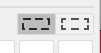
Soooo. The difference is really well hidden. It's this setting in the strokes panel: 

For throkes that work it's set to the right button.

I have set it that way for the other strokes as well and then I could export them (Export for screens)


I do not know why it doesn't work with the other setting. In both cases Illustrator exports them as dashed strokes (it doesn't expand them). But the code for the styling of the dashes just seems to not work for one of the strokes, but it does work for the other one. 


1 reply

Monika Gause
Community Expert
Community Expert
September 3, 2023

ose items have different appearances. Click on the circle in the Layers panel and then open the Appearance panel and compare

Inspiring
September 3, 2023

"ose items" I don't know what they are.
If I understood your indications (I'm new to Illustrator) from the appearance panel I don't see any different between the 6 elements (dashed lines) of which 2 are not seen in the svg file.


See screenshot of the appearance panel


Monika Gause
Community Expert
Community Expert
September 3, 2023

If you compare them to the other elements that do get exported, what is the difference?