



AIHostAdapter plugin Windows install
We're developing a CEP extensions which uses some events provided by the AIHostAdapter plugin (found here).
We're managing to install the plugin fine on Mac just by dragging the zipped .aip file into the plugins directory. But doing the same on Windows doesn't seem to be working. When I unzip the zipped directory into the plugins directory, the AIHostAdapter.aip file appears as a directory, not as an .aip file like the rest of the plugins in the directory: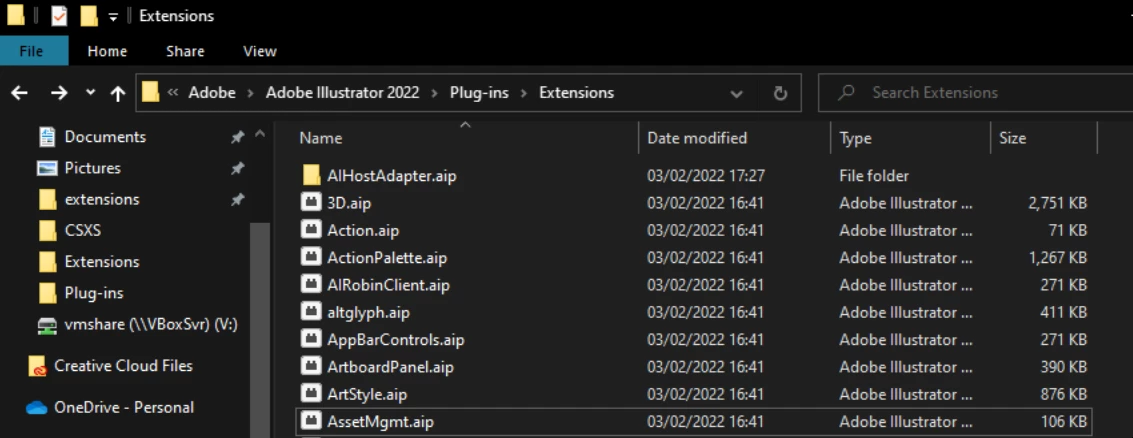
This does not seem to be recognised by Illustrator when I open it up.
I've tried keeping the zipped folder and renaming it back to have the .aip file extension, but that still doesn't seem to work: the structure of the directory obviously isn't right.
So, questions:
1. What is the correct installation process for the AIHostAdapter plugin on Windows?
2. Is there any existing documentation on how this can be installed?
3. Is the Github version of the plugin linked above the correct version?
4. Is there any way this installation process can be automated / performed automatically when our CEP extension is installed?
Thanks for any help!
 AdChoices