

Participant
July 16, 2026
Answered

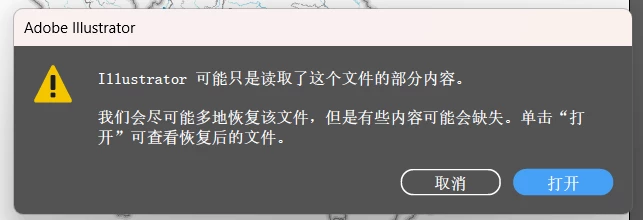
AI文件总是损坏不能正常打开

  • July 16, 2026
  • 5 replies
  • 50 views

大家好,我是来自中国的一名大学生,最近在完成制图作业,但是保存好的AI文件一直损坏,甚至仅保存了几分钟再打开也发现损坏,使用Recovery Toolbox也没法修复,想问一下怎样才能解决这个问题,感谢!

 

Correct answer ke

抱歉因为作业所以现在才回复,我翻看了社区中的类似问题,将首选项里的“在后台存储”关闭后问题解决,文件可以正常存储和打开,感谢您的评论😁

5 replies

Anubhav M
Community Manager
Community Manager
July 17, 2026

Hello ​@ke 


I’m sorry to hear about your experience. Would you mind confirming the versions of the OS/Illustrator installed, and whether this happens with files saved to a specific folder location (internal/external/network drive or a cloud-synced folder like Google Drive/Dropbox/etc), so we can better assist you?


Looking forward to hearing from you.
Anubhav

keAuthorCorrect answer
Participant
July 18, 2026

抱歉因为作业所以现在才回复,我翻看了社区中的类似问题,将首选项里的“在后台存储”关闭后问题解决,文件可以正常存储和打开,感谢您的评论😁

kglad
Community Expert
Community Expert
July 16, 2026

is this an illustrator question?

keAuthor
Participant
July 16, 2026

可能是的,因为用我电脑里的最新版本AI打开会出问题,但是使用机房电脑的AI 2022可以正常打开文件并找到图层里的要素😭

kglad
Community Expert
Community Expert
July 16, 2026

post this in the illustrator forum, https://community.adobe.com/p/illustrator


p.s. change your title to avoid a duplicate message problem.