
Participant
June 25, 2024
Question

Align Objects to a Line with Different Heights

  • June 25, 2024
  • 3 replies
  • 1076 views

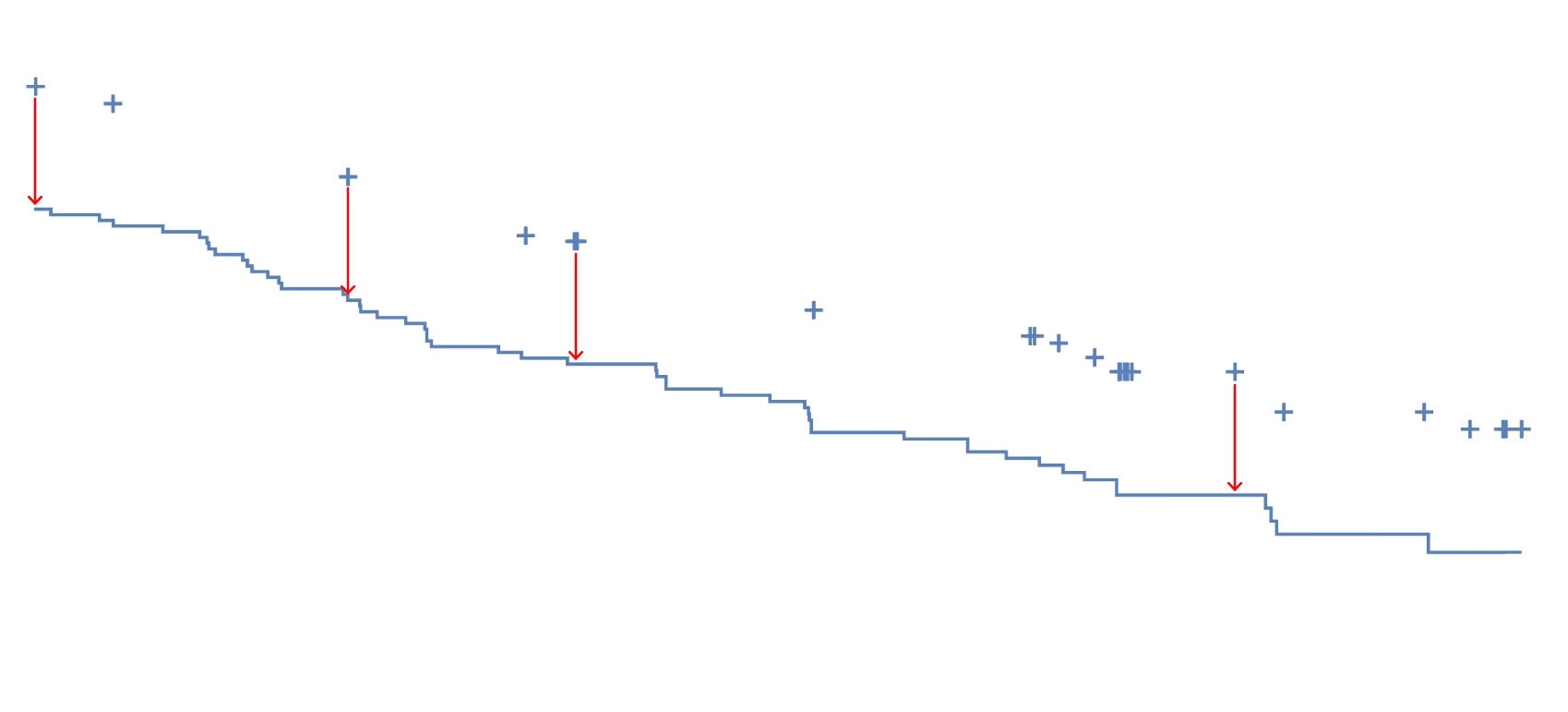
I'm wondering if there's a way for users to align objects to a line with varying heights. For example, I have a line that steps down at various places. Is there a way to align objects with each horizontal segment of the line at different heights? Ideally I would like to center align those objects with the horizontal line segments if possible.


This topic has been closed for replies.

3 replies

jduncan
Community Expert
Community Expert
June 28, 2024

If I understand your request, the script below should get you the desired result (see pic below). I tried to trace your reference path as close as possible for testing. I have also included before and after vector files for you to work with as well.


Looking at your example picture, the path starts and ends on a horizontal segment. With this in mind, the script just iterates over each set of 2 points, determines the center point between, and then draws a cross mark (offset above the path). All cross marks are put in a separate layer and grouped.


I set everything up to be customized, cross color, cross size, and cross offset. See comments in script...


Try the script out and let me know if it does what you need.


(function () {
  // setup variables
  var doc,
    sel,
    selectedPath,
    layer,
    crossMarksGroup,
    crossMarkSize,
    crossMarkVerticalOffset,
    crossMarkColor,
    p1,
    p2,
    centerPointX;

  // no need to continue if there is no active document
  if (!app.documents.length) {
    alert("No active document.");
    return;
  }
  doc = app.activeDocument;

  // no need to continue if there is no active selection
  if (!doc.selection.length) {
    alert("No active selection.");
    return;
  }
  sel = doc.selection;

  // get the **FIRST** pathItem of the selected objects
  for (var i = 0; i < sel.length; i++) {
    if (sel[i].typename === "PathItem") {
      selectedPath = sel[i];
      break;
    }
  }

  // no need to continue if no pathItems were selected
  if (typeof selectedPath === "undefined") {
    alert("No paths were selected.");
    return;
  }

  // create a new layer to hold the lines (use old if already present)
  try {
    layer = doc.layers.getByName("SCRIPT CROSSES");
  } catch (error) {
    $.writeln("layer not found");
  }
  if (typeof layer === "undefined") {
    layer = doc.layers.add();
    layer.name = "SCRIPT CROSSES";
  }

  // create a group to hold all cross marks
  crossMarksGroup = layer.groupItems.add();

  // setup cross mark
  crossMarkSize = 9; // points
  crossMarkVerticalOffset = 18; // point above line
  var crossMarkColor = new RGBColor();
  crossMarkColor.red = 255;
  crossMarkColor.green = crossMarkColor.blue = 0;

  // iterate over each set of 2 points and draw cross marks
  for (var i = 0; i < selectedPath.pathPoints.length - 1; i += 2) {
    p1 = selectedPath.pathPoints[i];
    p2 = selectedPath.pathPoints[i + 1];

    // skip set if y-values don't match
    if (p1.anchor[1] != p2.anchor[1]) {
      continue;
    }

    // calculate center point between x-values
    centerPointX = p1.anchor[0] + (p2.anchor[0] - p1.anchor[0]) / 2;

    // draw cross at center point
    drawCrossMark(centerPointX, p1.anchor[1]);
  }

  function drawCrossMark(x, y) {
    // make a group to hold cross mark parts
    var crossGroup = crossMarksGroup.groupItems.add();
    // draw x-line part
    var xLine = crossGroup.pathItems.add();
    xLine.setEntirePath([
      [x - crossMarkSize / 2, y + crossMarkVerticalOffset],
      [x + crossMarkSize / 2, y + crossMarkVerticalOffset],
    ]);
    // draw y-line part
    var yLine = crossGroup.pathItems.add();
    yLine.setEntirePath([
      [x, y + crossMarkVerticalOffset + crossMarkSize / 2],
      [x, y + crossMarkVerticalOffset - crossMarkSize / 2],
    ]);
    // set cross mark styling
    xLine.strokeColor = yLine.strokeColor = crossMarkColor;
    xLine.stroked = yLine.stroked = true;
    xLine.strokeWidth = yLine.strokeWidth = selectedPath.strokeWidth;
    xLine.filled = yLine.filled = false;
  }
})();


NCM81Author
Participant
July 3, 2024

Sorry, I don't think I was clear enough. The crosses should be vertically centered on the horizontal line segment below them. Many times, I get outputs from SAS or r (graphing programs) where the created objects don't cross the horizontal line segment it rests on directly in the middle of the object. Thank you for the script, but this doesn't do quite what I need it to. See my reply to Kurt Gold above.

Kurt Gold
Community Expert
Community Expert
July 3, 2024

I'm sure Josh Duncan's script actually is what you are looking for. You just have to change line 59.


Instead of


  crossMarkVerticalOffset = 18;


just use


  crossMarkVerticalOffset = 0;


One could also create an action, but Josh's script does it very well.

Kurt Gold
Community Expert
Community Expert
June 25, 2024

Do the objects always have the same shape, size and appearance attributes (like the crosses in your screenshot)?

NCM81Author
Participant
June 27, 2024

Yes, the objects will always have the same size, shape, and appearnce attributes.

Kurt Gold
Community Expert
Community Expert
June 27, 2024

Does that mean that something as shown in the screenshot below may be the desired result?


Jacob Bugge
Community Expert
Community Expert
June 25, 2024

NCM,


You can:


1) Deselect the stepwise path (you can Click an empty spot to make sure);

2) With the Direct Selection Tool ShiftClick each and all of the path segments you wish align to;

3) Ctrl/Cmd+C+F (hold Ctrl/Cmd and press C then F) to copy all of them as independent paths;

4) Object>Transform>Move vertically by the desired distance up to the objects (negative value unless old version);

5) Deselect, then centre align each object (set) to each of the lines from 4), using it as the key object.


NCM81Author
Participant
June 27, 2024

Thank you for these steps. This is pretty easy to follow until the paths become a lot more complicated. I was hoping there was a script that would recognize the lowest point of a path below the object to be aligned with it. For instance, if the line segment looks like this, it seems like it would take a tremendous amount of time when the path is more complicated.