Known Participant
June 5, 2023
Answered

Align text baselines

  • June 5, 2023
  • 4 replies
  • 4075 views

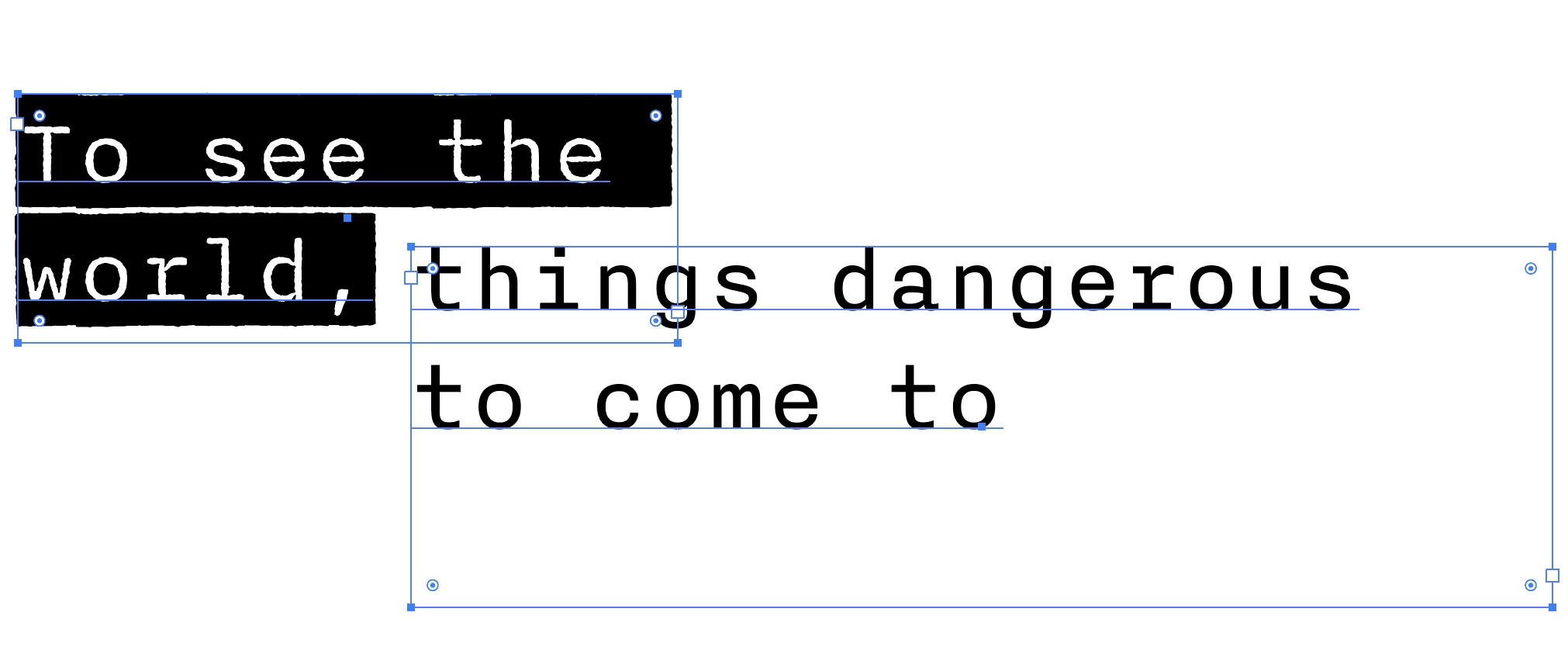
Hello, I'm wondering if there's a way to align baselines in two different text boxes. I would to have the baselines of "world," and "things dangerous" match up. Thanks!

This topic has been closed for replies.
Correct answer CarlosCanto

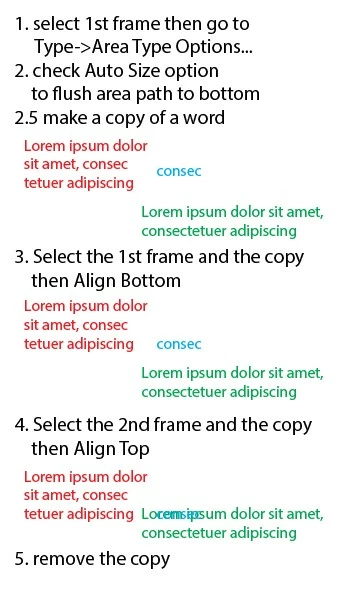
here'a another way of doing it


4 replies

pixxxelschubser
Community Expert
Community Expert
August 24, 2023

@lindentree 

Perhaps this (script) solution could also be interesting for you, although unfortunately it only works with Pointtext.

see here:

Adobe Illustrator | Align different sized text to the bottom of the text baseline 


Community Expert
June 5, 2023

Currently Adobe Illustrator has no true alignment commands that align the first or last baselines of a point or area text object to another object, be it a geometric vector object or another text object. You can use Smart Guides to manually drag a text object and make its baseline snap to something else. But that is not the same as merely selecting a text object, clicking another object and then clicking an alignment command button (or keyboard shortcut) to instantly relocate the text object to the desired position. If you're wanting to align or distribute multiple text objects in reference to their baselines the act of manually dragging the text objects can turn into a time-wasting chore. 


I have made feature requests to the Illustrator UserVoice forum about this. Other users have requested it as well. I've also pointed out that certain rival graphics applications (such as CorelDRAW) have had such a feature for many years. I would suggest visiting the Illustrator feature requests sub-forum there and either write a feature request or vote for one of the other posts where users have made similar feature requests. I think the Illustrator development team is aware of such requests and it is on their to-do list. But I have no idea if or when the feature will be added. I suppose if enough Illustrator users make enough noise about it we'll finally see the feature added.
https://illustrator.uservoice.com/

Egor Chistyakov
Inspiring
June 7, 2023

The specific request you refer to is this one — I think it fits the description pretty tight.

The other comment you mention it in was made in this thread about Font Height Options.


CarlosCanto
Community Expert
CarlosCantoCommunity ExpertCorrect answer
Community Expert
June 5, 2023

here'a another way of doing it


Egor Chistyakov
Inspiring
June 5, 2023

Snap to Glyph option could have helped, but id does not work with area type — only wtih point type.
So if I had a task like this at hand, this is what I’d do:

1. Created copies of both texts in placa

2. Outlined them

3. Move the one at the top to snap to the one at the bottom

4. Repeated the tranformation with Cmd/Ctrl + D for the live text copy

5. Deleted both outlined copies