Inspiring
June 16, 2021
Question

Aligning in Illustrator
  • June 16, 2021
  • 2 replies
  • 2171 views

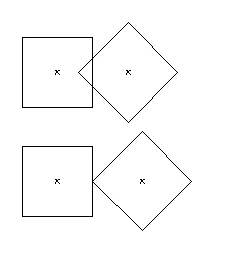
Is there an easy way in Illustrator to "push" overlapping vectors so that the Right shape is butted up against the Left shape, without moving the Left Shape at all?


Thank you! 

This topic has been closed for replies.

2 replies

Jacob Bugge
Community Expert
Community Expert
June 16, 2021

Bryan,


As I (mis)understand it, you can:


1) Select both squares/whatever, then click the leftmost one once more to make it the key (unmoveable) object;

2) In the Align panel, first centre align vertically, then distribute spacing horizontally with the distance set to 0.


Inspiring
June 17, 2021

Jacob,

You are definitely going in the right direction for me.  I'm looking to automate this if possible with an Action or Script.

I'd like to manually select a row of shapes then automate

Group All but the left-most shape selected

Set the left-most shape as the key object

Distribute Spacing Horizontally .0235 in

Ungroup the selection


Would that be possible?


Jacob Bugge
Community Expert
Community Expert
June 17, 2021

Bryan,


I am sure that Femke, or another scripting friend, will soon see, and post a script for that.

femkeblanco
Legend
June 16, 2021

For the simplest case


// select 2 path items
if (app.selection[0].left > app.selection[1].left) {
    var right = selection[0], left = selection[1];
} else {
    var left = selection[0], right = selection[1];
}
if(right.left < left.controlBounds[2]) {
    right.left = left.controlBounds[2];
}


If you want to test for overlap beforehand, see

https://community.adobe.com/t5/illustrator/geometric-test-functions/m-p/12080581


GerssonDelgado
Inspiring
June 16, 2021

@femkeblanco  how can I center horizontal and vertical, an object into artboard?

help will be appreciated!

femkeblanco
Legend
June 16, 2021
// select path
var x = app.activeDocument.width / 2;
var y = -app.activeDocument.height / 2;
var sel = app.activeDocument.selection[0];
sel.position = [x - sel.width / 2, y + sel.height / 2];