
Jeremy McCarter
Participant
October 2, 2017
Answered

Aligning text to a grid/shape.

  • October 2, 2017
  • 2 replies
  • 1938 views

Just a quick one.

Is there a simpler process for placing text on a grid or evenly within a shape. For example, in my case I need to place the works "twenty one" on a 3x3 grid with the letters aligned to each other.

TWE

NTY

ONE

Like so ^

I've managed to get it close by breaking a square into a 3x3 grid then trying to align the individual characters to the grid by eye. I assume there would be an easier way of getting the result shown below.

This is the closest example I could find which breaks up one word to fit a shape: How To Use Type — Typography Posters Critique Pt. 2 - YouTube

Thanks a lot!
This topic has been closed for replies.
Correct answer JETalmage

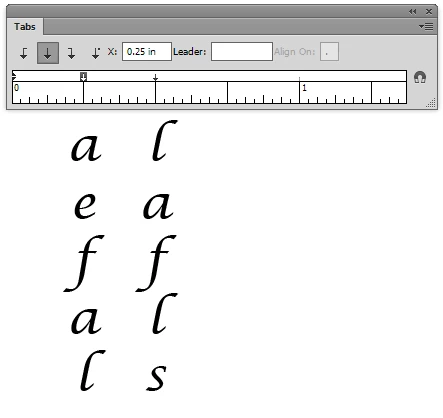
Set up a Paragraph Style with three evenly spaced center tabs. Type a tab character before each letter. Apply the Style to the text.

Or, use a monospaced font.

JET

2 replies

JETalmage
JETalmageCorrect answer
Inspiring
October 2, 2017

Set up a Paragraph Style with three evenly spaced center tabs. Type a tab character before each letter. Apply the Style to the text.

Or, use a monospaced font.

JET

Mylenium
Legend
October 2, 2017

Editable text doesn't adhere to the usual snapping and alignment methods and tools, so no, there is no magic way. Only converting to outlines will give you access to those alternate options, though I'm not sure how useful that would be. A lot of text stuff still hinges on a visual balance rather than an absolute perfect alignment in the technical sense.

Mylenium