Participating Frequently
June 6, 2017
Answered

Alignment and distribution tools is not working

  • June 6, 2017
  • 2 replies
  • 1125 views

Help I very frustrated!!!

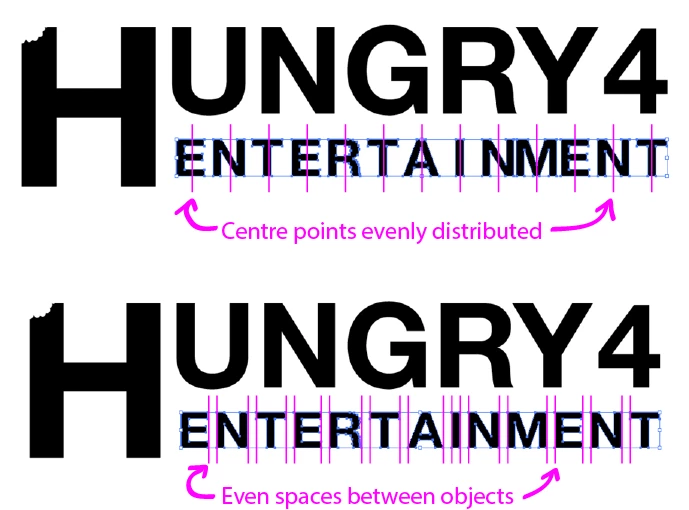
My alignment and distribution tool is not working. The tool is not distributing the spaces evenly in the selected objects.


This topic has been closed for replies.
Correct answer Doug A Roberts

'horizontal distribute center'

i hope this makes sense


to demonstrate:
2 replies

Doug A Roberts
Community Expert
Community Expert
June 6, 2017

can you show a screenshot of these objects before you align them and after the result you get?

Participating Frequently
June 6, 2017

'horizontal distribute center'

Participating Frequently
June 6, 2017

'horizontal distribute center'

i hope this makes sense

Doug A Roberts
Community Expert
Community Expert
June 6, 2017

can you describe what you're doing step-by-step, tell us where exactly it's not working, and what if anything happens instead of what you expect.

Participating Frequently
June 6, 2017

Hi Doug,

I use the 'selection tool' to the select the desired objects

I then select 'horizontal distribute center' in the align panel and the objects bunch mostly to the right unevenly.

I then try 'horizontal distribute space' and the objects spread out more but not evenly.

Monika Gause
Community Expert
Community Expert
June 6, 2017

You are distributing the word "Entertainment"?

Mind that Illustrator doesn't distribute the letter shapes, but rather a bounding box (which is a rectangle) around the letter shapes. The letters T and A need to be very close. The bounding box of the A will need to be partly within the bounding box of the T. This will never work out as expected.