


Participant
July 1, 2025
Answered

Alineación vertical por variación de cuerpo en texto puntual

  • July 1, 2025
  • 1 reply
  • 181 views

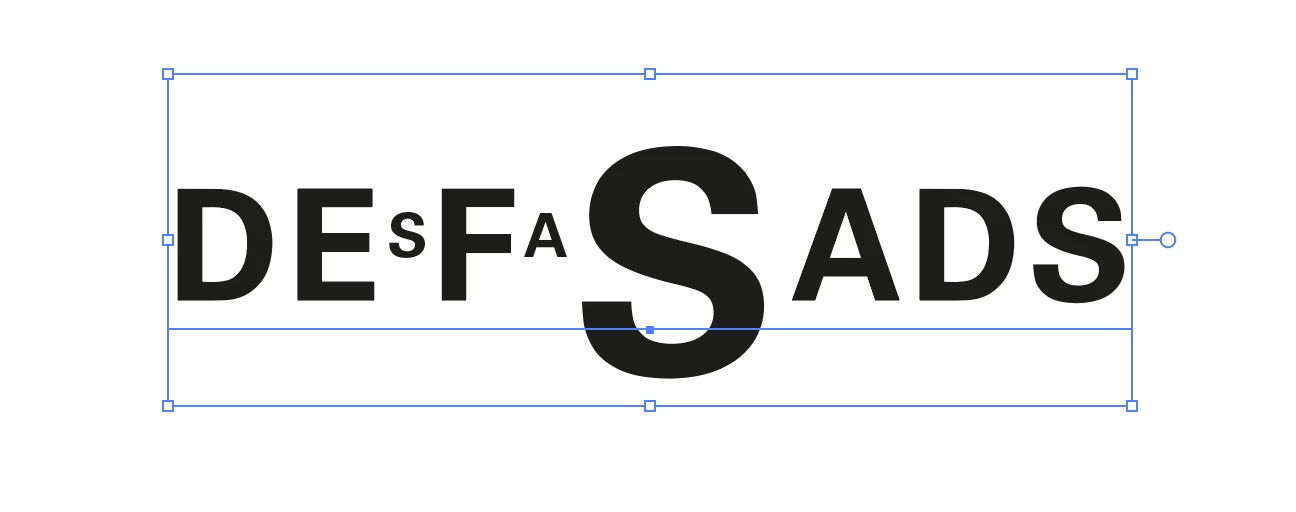
Tengo un texto puntual (Point Type), y cuando varío el tamaño de alguno de los caracteres, se produce un centrado en el sentido vertical, desplazando las letras de la línea base.
Generé estilos de párrafo y de carácter para tener un resumen de todas las características del texto, y no consigo dar con el comando que genera esta variación.
No se trata de la tipografía ni de sus variantes. En el ejemplo, utilicé Arial, a modo genérico.
Probé todo lo vinculado al panel de alineación y de Area Type…
Tampoco ChatGPT pudo identificar cuál es el problema en esa línea.
¿A alguien más le ocurrió esto?
Puedo generar un texto nuevo, de cero, sin ese efecto. No es ese el problema. Mi objetivo es saber cuál es la función, porque me podría ser útil en otros trabajos.

Gracias
 

Correct answer Jacob Bugge

Ibarra,


Maybe too silly, but how about simply reusing the style of the unique text, as a template?


You can try this:


1) Copy this unique text and paste it in a known place, then create a live copy and lock the original to avoid accidental deletion, then:

2) Copy the live copy from there and paste it wherever desired, including a new document or Layer, then:

3) Insert the desired new text in the pasted live copy and delete the original text, then in the new text:

4) Change the size(s) of one or more of the characters as desired, thereby reusing the style of the unique text.


1 reply

Jacob Bugge
Community Expert
Jacob BuggeCommunity ExpertCorrect answer
Community Expert
July 1, 2025

Ibarra,


Maybe too silly, but how about simply reusing the style of the unique text, as a template?


You can try this:


1) Copy this unique text and paste it in a known place, then create a live copy and lock the original to avoid accidental deletion, then:

2) Copy the live copy from there and paste it wherever desired, including a new document or Layer, then:

3) Insert the desired new text in the pasted live copy and delete the original text, then in the new text:

4) Change the size(s) of one or more of the characters as desired, thereby reusing the style of the unique text.


Participant
July 1, 2025

Hola Jacob. 
Gracias por tu respuesta.

Seguramente haré algo así. Aunque seguiré sin saber cuál es la función que permite ese efecto.

Jacob Bugge
Community Expert
Community Expert
July 1, 2025

You are welcome, Ibarra.


Have you made sure that reusing it works?
