
Participating Frequently
June 26, 2023
Answered

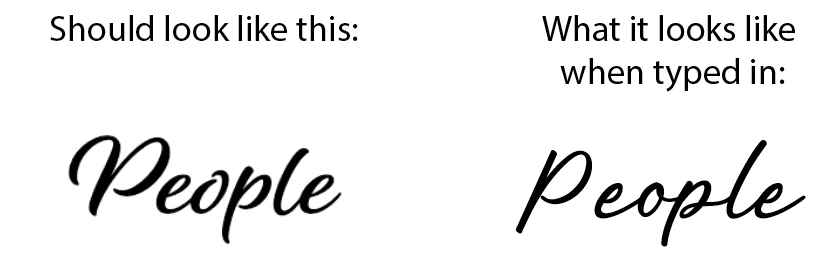
Alisha font doesn't look like the preview.

  • June 26, 2023
  • 1 reply
  • 1572 views

Hello Fellow Creatives,

I've activated the 'Alisha' font (by Laura Worthington Type) available through Adobe. Once I typed something into Illustrator with this font, it looked nothing like the preview on the Adobe Fonts page. This has never happened to me before.
Any idea what the issue could be? Below is a screenshot comparison done in Illustrator of what the font should look like.
 

Thanks in advance!


This topic has been closed for replies.
Correct answer Monika Gause

Do you perhaps have another fonts with the same name installed? Or did you have in the past?


You might need to do some serious debugging: https://helpx.adobe.com/fonts/kb/troubleshoot-fonts-illustrator-indesign.html 

1 reply

Community Expert
June 26, 2023

Obviously a different typeface is being rendered rather than Alisha. The Alisha typeface has no glyphs that look like that. I'm able to sync it and preview it properly. The first troubleshooting step should be making sure you're signed into the Creative Cloud application. Also check the Adobe Fonts web site to make sure you're signed in there.
https://fonts.adobe.com/


Test other fonts you have synced to make sure they're working properly. You might try removing and re-synching Alisha to see if it will load properly.


Next, is your computer running any font management applications? Is your computer running other graphics applications at the same time as Adobe Illustrator? I'm asking this question because I've seen weird conflicts myself between CorelDRAW, its built-in font manager and Adobe Illustrator. I can't have both applications running at the same time without the font menu in Illustrator being affected. CorelDRAW has some of its own internal problems handling fonts.

Participating Frequently
June 26, 2023

Hi Bobby,

Thank you for replying so quickly! Alas, I've done everything that you mentioned. We don't use Corel here at work, just Adobe products. I've even restarted my computer and apps, but it's still showing up the same. Thanks

Monika Gause
Community Expert
Monika GauseCommunity ExpertCorrect answer
Community Expert
June 26, 2023

Do you perhaps have another fonts with the same name installed? Or did you have in the past?


You might need to do some serious debugging: https://helpx.adobe.com/fonts/kb/troubleshoot-fonts-illustrator-indesign.html