
Participant
February 20, 2020
Answered

All fonts missing in Illustrator

  • February 20, 2020
  • 1 reply
  • 2029 views

I can't change any fonts I make away from the default. The list just says "No results found" as seen below:
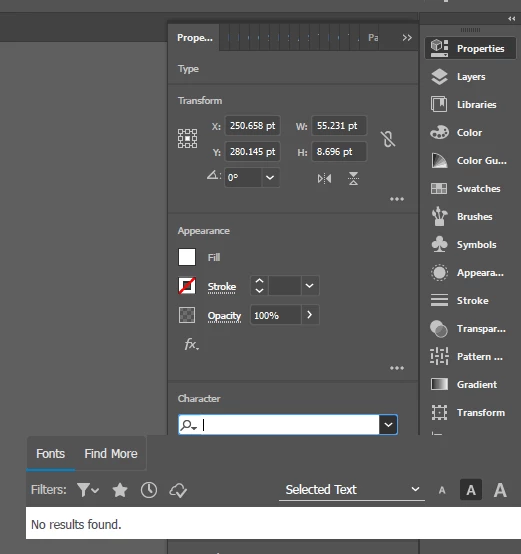
I have tried updating and restarting, downloading new fonts from creative cloud, and opening documents with existing text but the result is always the same. I hope this is something silly I am missing but I can't find any info on this.

This topic has been closed for replies.
Correct answer meganchi

If you go to Window menu, select Type, then "Character", can you see any fonts directly in the Character panel instead of trying to see them in the Properties panel?

1 reply

meganchi
meganchiCorrect answer
Legend
February 20, 2020

If you go to Window menu, select Type, then "Character", can you see any fonts directly in the Character panel instead of trying to see them in the Properties panel?

Participant
February 20, 2020

Yeah, that seems to have worked. It also updated the properties panel to start working as well.

Is that typical? Was I going about it the wrong way?

meganchi
Legend
February 20, 2020

I normally don't use the properties panel to select fonts, so I'm not sure if that is typical behavior. But, I 'm glad using the Character panel worked out for you.