Participant
February 16, 2019
Answered

Alternating Free Transform Tool anchor points?

  • February 16, 2019
  • 5 replies
  • 838 views

I am trying to figure out why the Free Transform Tool appears differently on two separate PC laptops.  Illustrator is the same version and the preferences and View options are the same for both.

Cannot locate any preferences or View options to change the way the Tool looks.  Why does one use large circles and the other does not?

This topic has been closed for replies.
Correct answer Omar.Fathy

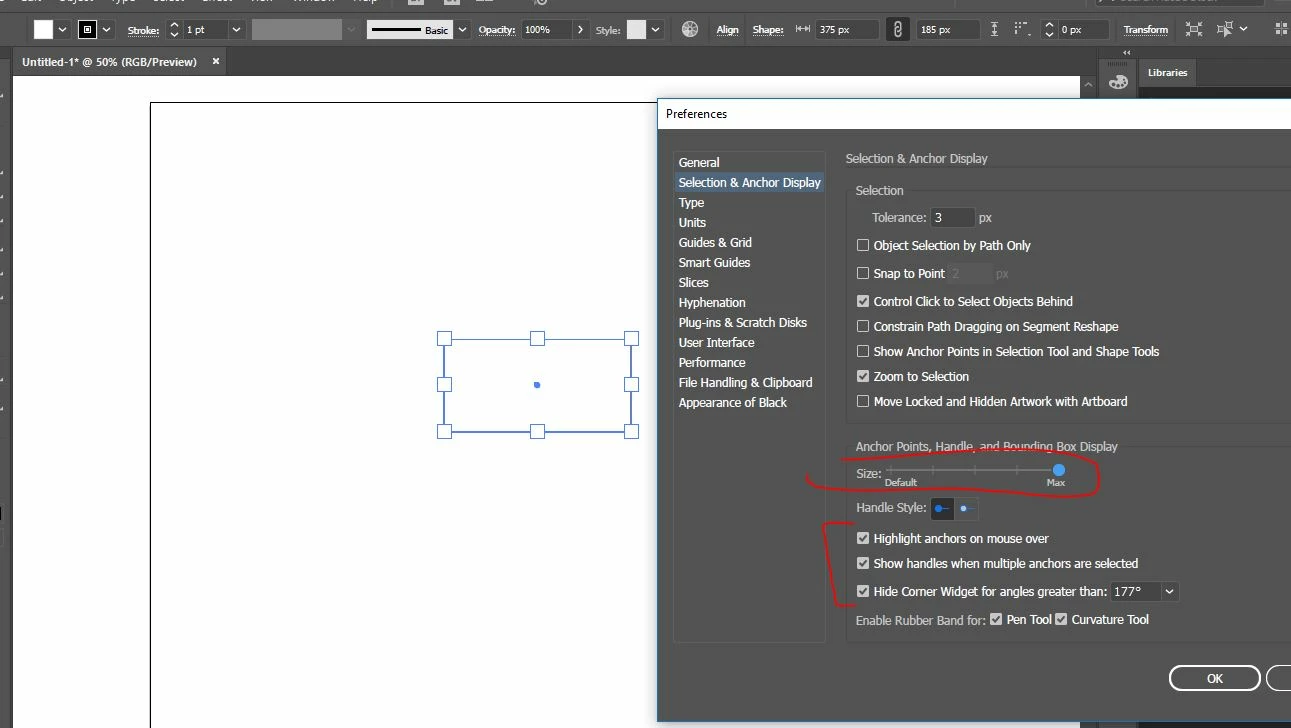
From Edit > Preferences > Selection & Anchor Display,

you can adjust the Bounding Box Anchors display.

5 replies

Participant
February 18, 2019

Thank you everyone!  Yes, the one on the 'left' is touch enabled, whereas the 'right' side is not. 

Doug A Roberts
Community Expert
Community Expert
February 16, 2019

On a previous version, Illustrator was convinced for some time that my computer was a touch-enabled device, and it displayed transform handles in that way.

Monika Gause
Community Expert
Community Expert
February 16, 2019

Is one of those machines probably touch enabled?

Omar.Fathy
Community Expert
Omar.FathyCommunity ExpertCorrect answer
Community Expert
February 16, 2019

From Edit > Preferences > Selection & Anchor Display,

you can adjust the Bounding Box Anchors display.

Daniel E Lane
Inspiring
February 16, 2019

The one on the left is really tiny and you are zoomed way in on it. The other is rather large. Did you try to make it a similar size as the other and zoom in to it as well?