
Chris  P.  Bacon
Inspiring
December 25, 2022
Question

An effective way to change color of JPG paper texture in Illustrator?

  • December 25, 2022
  • 11 replies
  • 1326 views

I mean a temporary change without the need to move over to Photoshop?
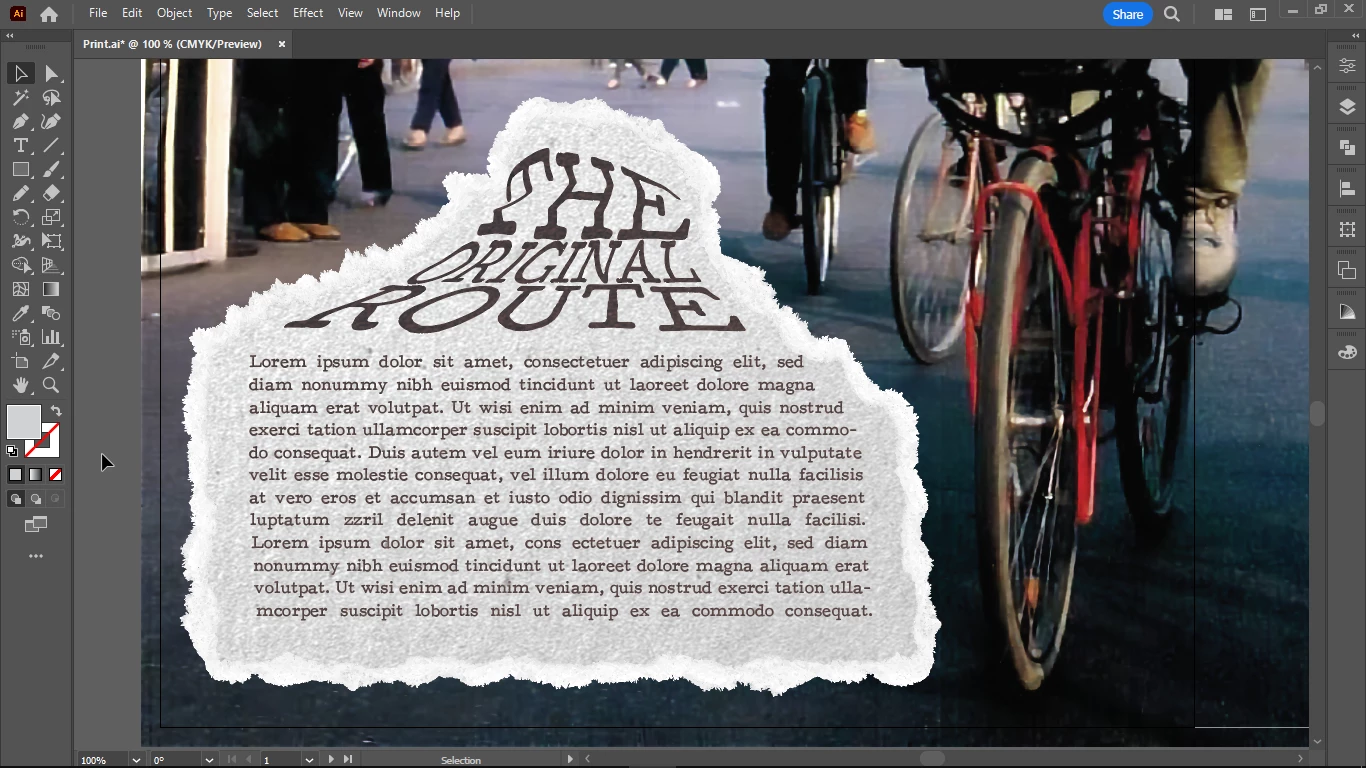
I would like to change the color of the light gray paper texture with the eyedropper tool, I mean to pick a color with the eye dropper tool, from the image.


This topic has been closed for replies.

11 replies

Monika Gause
Community Expert
Community Expert
December 25, 2022

For greyscale images it should work to just pick a color from somewhere. But the effect still might not look like what you imagine. This JPEG is already applied as a pattern? Then it will not work. The color has to be applied first.

Chris  P.  Bacon
Inspiring
December 25, 2022

The light grey paper texture is a JPG swatch, and it's already applied.
I don't know the theory how you get the best color reproduction.

I could use transparency blend modes for example difference and exclusion, anything else I thinks needs to be done in Photoshop.

What is the best way to totally recolor a paper texture?

Not just tint, but totally recolor, change the color?

But to not loose the texture, it must be a tint, I think.