pixxxelschubser
Community Expert
Community Expert
June 14, 2024
Question

An interesting question for scripters. Select does not work. Bug or feature?

  • June 14, 2024
  • 1 reply
  • 526 views

I normally avoid working with selections in the script, so I haven't noticed such an error yet.


I found this question in another forum.

Selecting a TextFrame created in the script does not work as desired.


This is the code used:


var myDoc = app.activeDocument;
var topLay = myDoc.layers.add();
topLay.name = 'LABEL';
var txt = topLay.textFrames.add();
txt.name = 'LABEL Text';
txt.contents = "inhalt";

topLay.textFrames[0].selected = true;


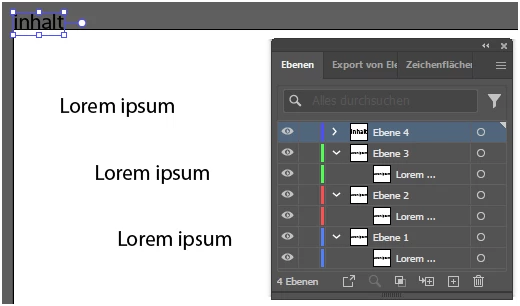
Result (text frame seems to be selected but is not)

-->
 

-----------------------------------------------------------------------------------------------------------------


Possible remedies after some quick tests:

1)   (Because it is only the only element in the newly created layer) Change the last line to:


topLay.hasSelectedArtwork = true;


works right away in this case.

-->
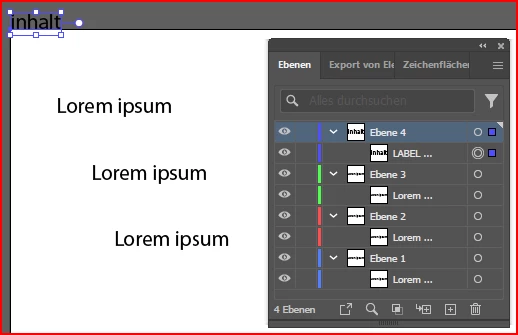
 

2)  If the document is closed and reopened in the script, the TextFrame can also be selected correctly (this was only a test, however, as it is not practical).


3)  If the selection is deselected in the script and then called up again, it works without any problems.


var myDoc = app.activeDocument;
var topLay = myDoc.layers.add();
topLay.name = 'LABEL';
var txt = topLay.textFrames.add();
txt.name = 'LABEL Text';
txt.contents = "inhalt";

topLay.textFrames[0].selected = true;
myDoc.selection = null;
topLay.textFrames[0].selected = true;


Can you understand this? Do you have an explanation for this?


---------------------------------------------------------------------------------

Tagging only

@CarlosCanto @Charu Rajput @m1b @femkeblanco @jazz-y @Sergey Osokin 


This topic has been closed for replies.

1 reply

Sergey Osokin
Inspiring
June 14, 2024

I'm now assuming that the script problem is due to the delay in updating the layer panel. New layer is empty, then TextFrame appears in it, new layer is collapsed. The script knows that the TextFrame already exists, but Illustrator does not "see" it in the new layer. We need to redraw the screen:
1) app.redraw() - it will enlarge the document history (X)
2) call some event on the screen before selecting an object ()


var myDoc = app.activeDocument;
var topLay = myDoc.layers.add();
var txt = topLay.textFrames.add();
txt.name = 'LABEL Text';
txt.contents = "inhalt";

topLay.textFrames[0].translate(0,0); // Fake move event
topLay.textFrames[0].selected = true;


pixxxelschubser
Community Expert
Community Expert
June 14, 2024

Hi Sergey,

thank you.


I suspect the same thing.


That will also be the reason why 'hasSelectedArtwork' works.

This is because the search is not specifically focussed on the text frame, but everything on the layer must be searched.. And at this time the new text frame is also available to Illustrator.


You have mentioned the fourth variant and it also works.


app.redraw(); // works
topLay.textFrames[0].selected = true;


Your 'fake event' also works.  😉

topLay.textFrames[0].translate(0,0); // Fake move event - also works 
topLay.textFrames[0].selected = true;


Just for the sake of completeness:

A sixth and seventh variant are neither practicable nor do they work.


$.sleep (1000); // does not work
topLay.textFrames[0].selected = true;


or


alert("short forced break"); // does not work
topLay.textFrames[0].selected = true;


Sergey Osokin
Inspiring
June 14, 2024

We can also observe a funny bug when we place TextFrame in the selection array. The bounding box around it will appear on the artboard, but it will not be highlighted in layers, i.e. the object is still not really selected.


var myDoc = app.activeDocument;
var topLay = myDoc.layers.add();
var txt = topLay.textFrames.add();
txt.name = 'LABEL Text';
txt.contents = "inhalt";

app.selection = [topLay.textFrames[0]];