Participant
September 15, 2022
Answered

An issue with the Line Graph Tool

  • September 15, 2022
  • 2 replies
  • 628 views

Hey there! An Illustrator newbie here.


I am experiencing an issue with the Line Graph Tool under Illustrator 25.0.1.


When drawing my graph, the resulting graphic is quite weird. Like if all the strokes were weirdly enlarged or something. I have attached a screenshot to give you an idea of the phenomenon.


I do the graph in an A4 document with 300 ppi raster effects.


Please advise! And thank you in advance!
This topic has been closed for replies.
Correct answer Mike_Gondek10189183

The default stroke weight is 1pt, so on a small graph the strokes will look too heavy.


If you do intend to print such a small graph, then

  1. click on a stroke with hollow arrow tool
  2. select >> same stroke weight
  3. then change to for example .5 pt in stroke palette. 


if your graph is too small, then

  1. select entire graph
  2. alt click scale tool on page (to get the options)
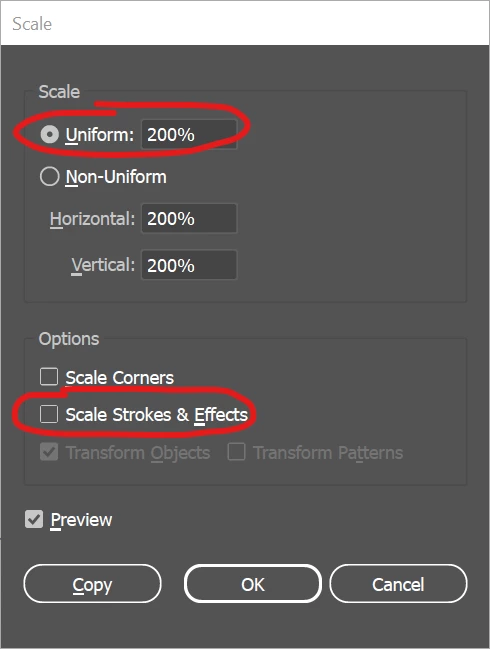
  3. input a larger scale number like 200%, and uncheck scale strokes
  4.  


2 replies

Mike_Gondek10189183
Community Expert
Mike_Gondek10189183Community ExpertCorrect answer
Community Expert
September 16, 2022

The default stroke weight is 1pt, so on a small graph the strokes will look too heavy.


If you do intend to print such a small graph, then

  1. click on a stroke with hollow arrow tool
  2. select >> same stroke weight
  3. then change to for example .5 pt in stroke palette. 


if your graph is too small, then

  1. select entire graph
  2. alt click scale tool on page (to get the options)
  3. input a larger scale number like 200%, and uncheck scale strokes
  4.  


Monika Gause
Community Expert
Community Expert
September 16, 2022

You are zoomed in 1200 percent. So the issue might be cause by the chart being too tiny.

Zoom out and create the chart in a larger size.


Illustrator doesn't adapt the data markers proportionally to the chart size.

Participant
September 16, 2022

Oh. My. God.

I am so sorry. I feel really stupid. 😄

Thank you so much, Monika and Mike, for your answers!