
AndrewSouthard
Inspiring
December 14, 2022
Answered

An odd red dot has appeared since 14/12/22 update

  • December 14, 2022
  • 7 replies
  • 3007 views

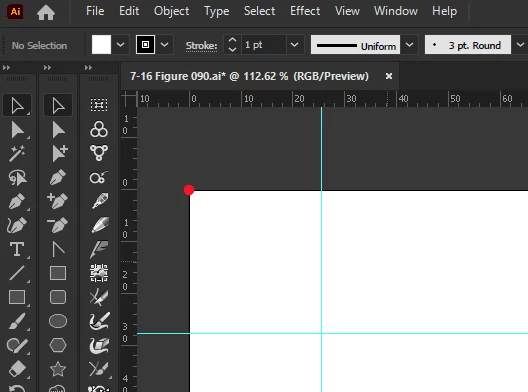
This morning I've acquired a red dot on the top left corner of every artboard. It goes away if I press control or the spacebar but returns when I let go. It doesn't seem to do anything except trigger my OCD... is it some sort of Christmas decoration?
This topic has been closed for replies.
Correct answer AndrewSouthard

I have just had this news from AG team, they have found the culprit.


"Late yesterday I discovered the cause of the red dot: our Stylism plugin, when accompanied by some uninitialized variables being set to certain values (apparently the native Brush tool's circular annotation being similar was coincidental). The next build of Stylism will fix this; the way to make the dot go away is just to select the Stylism tool (which can be unselected immediately thereafter)."

7 replies

AndrewSouthard
AndrewSouthardAuthorCorrect answer
Inspiring
December 28, 2022

I have just had this news from AG team, they have found the culprit.


"Late yesterday I discovered the cause of the red dot: our Stylism plugin, when accompanied by some uninitialized variables being set to certain values (apparently the native Brush tool's circular annotation being similar was coincidental). The next build of Stylism will fix this; the way to make the dot go away is just to select the Stylism tool (which can be unselected immediately thereafter)."

Rene Andritsch
Community Expert
Community Expert
January 30, 2023

After installing the latest update from AG I can see this issue is resolved under macOS 12.6 and AI 27.0.1

Inspiring
December 23, 2022

I was seeing that red dot too.  It appears either in top left or bottom left corner.  It started when I updated to Illustrator 27.1.1.  I just restarted Illustrator and I don't see it now.  But from what I'm reading in the comments it may come back.  I'm also using Astute Graphics plugins.

AndrewSouthard
Inspiring
December 23, 2022

It's almost certainly a clash between Illustrator and AG as everyone who's had a red dot is an AG user. We found an unfilled dot that is down to selecting Illustrator brush tools, but it's a different issue. AG techs are looking at it, but it must be a nightmare as it's so on/off random. I've not seen it since day 1 that drove me mad, since then, nothing. How can you fix what you can't see.

Kurt Gold
Community Expert
Community Expert
December 16, 2022

In recent Illustrator versions (for example AI 27.1 on Mac OS 12.5 (without any Astute plugins)) I've sometimes seen similar baubles, but they are less colourful.


In my case they do appear when you create a new document, immediately go to the Brushes palette, select all default brushes (if there are some) and delete them all in one whack.


Then I can sometimes see an untouchable bauble like this one at the top left corner of *one* artboard:


It usually disappears when you save, close and reopen the document.


Nice.


AndrewSouthard
Inspiring
December 16, 2022

Ahhh, so maybe it's not AG. Interesting.

christianherbstreuth
Known Participant
December 16, 2022

Same Problem here ... Monterey + AI  27.1

AndrewSouthard
Inspiring
December 16, 2022

Are you an Astute Graphics user too?

christianherbstreuth
Known Participant
December 16, 2022

Yes.


But did no Update in the last Days ...

AndrewSouthard
Inspiring
December 14, 2022

I seem to have been the only one afflicted, and after a coincidental windows update and restart, the issue is resolved. No one in the AG community "me too"-ed the issue so it's a mystery.

AndrewSouthard
Inspiring
December 15, 2022

Nope, false hope it's intermittent. Two other AG users on Mac are now seeing it so it wasn't a windows thing, so it probably is plugin-related.

jhbradley610
Participating Frequently
December 16, 2022

I had the same thing on mine. AI 27.0.1 on Win10 with all the AG plugins.

Though it seems to have gone away at the moment. Maybe it'll return, maybe not.

Doug A Roberts
Community Expert
Community Expert
December 14, 2022

Which update? 27.1 or a beta?

Any plugins installed that were also updated recently?

AndrewSouthard
Inspiring
December 14, 2022

27.1, I don't beta, too busy 🙂

My only plugins are Astute graphics, but they haven't updated in the timeframe.

Monika Gause
Community Expert
Community Expert
December 14, 2022

I would assume some Astute Graphics intervention there.

AndrewSouthard
Inspiring
December 14, 2022

No AG updates in the timeframe, but one from Illustrator, hence me leaning towards it being Illustrator. I'll post it In AG also to see if anyone there has it.