anchor point tool flattens curves
Hello - I'm using Illustrator version 24. The Anchor Point tool seems to be working differently than in previous versions of Illustrator and I'm wondering if/how to get it working as it used to. I'm attaching an image to demonstrate. If I start with Path 1 and want to get to Path 2, I previously had to simply click and drag horizontally on the middle anchor point on Path 1 with the Anchor Point Tool to convert the corner point to a curved point. But when I try to do this in this latest version of Illustrator, I instead get Path 3: the first curve flattens out. I have to then drag a handle with the Direct Selection Tool to restore a curve. Similarly, if I'm starting with Path 2, but I want something that looks like Path 1, I can't convert the middle anchor point to a corner point using the Anchor Point Tool. If I try, I again get path #3, rather than path #1.
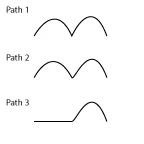
I've only started noticing this behavior since upgrading to version 24, and I'm finding this behavior a bit disruptive to my workflow. Is this intended to be helpful in some way that I'm not seeing? Is there a keyboard shortcut that makes this tool work as it used to? Is this a behavior that can be adjusted in Preferences? Or is this just a bug?
I have tried using the Convert buttons in the Control Panel and Properties Panel, but I get similar results. Curving or Cornering simply flattens out the first curve rather than adjusting the selected anchor point.
Thank you
 AdChoices