

Jongware
Community Expert
Community Expert
Oct 1, 2010 11:28 PM UTC
Answered

[Ann] Design effect - image made of perfectly arranged circles

Ever wondered how to perfectly fill an outline with touching circles? I did -- after seeing the example image in Solving design effect - image made of perfectly arranged circles.


It took me a while to get the proper calculations, but -- Here It Is! A Javascript, written for Illustrator CS4 (it might work on other versions as well), that fills a selected outline with circles. Download zipped script from my site: #1 http://www.jongware.com/binaries/CircleFill.zip #2 (https://shared-assets.adobe.com/link/7cf1dee2-08bc-435f-6fbc-546d36937712) unpack if necessary, and put it in your Illustrator Scripts folder to make it available the next time you run Illy, or anywhere else (you have to browse for it each time).


Select any path -- but no live text, please; you have to convert it to outlines and select each character in turn. Then run the script.

It displays a simple dialog, where you can set a maximum and minimum circle size as a percentage of the selected object size. In addition, you can select either a plain basic color, or select any of your current Swatch Groups; in that case, each of the circles are filled with a random color from that group.


The script may take a while to run. Usually, only a couple of seconds for a simple rectangle, but it may run into minutes for objects with lots of curves and/or holes. I didn't have the guts to run it on a vectorized world map, to recreate Mario "Quasimondo" Klingemann's Foam World Map; but, in theory? Possible.


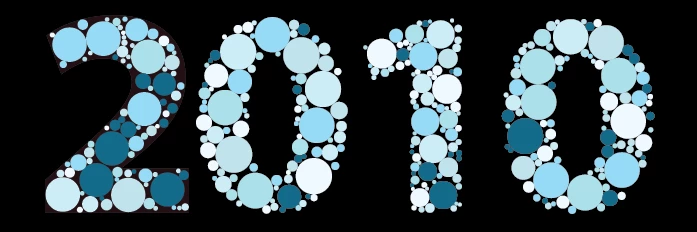
This image only took a few minutes:


Enjoy, everyone!


{Script Download Link option Updated by MOD}

Anshul_Saini
Anshul_SainiCorrect answer
Community Manager
Sep 7, 2021 7:07 PM UTC

Hi @Merchant Girl and @Long98A1,


Thank you for reaching out. I have added a second option to download the script created by OP @Jongware.

I hope it helps.


Thanks & regards,

Anshul Saini

74 replies

Klаus
Inspiring
Feb 11, 2024 9:17 PM UTC

Trying to define some »color-blind charts« procedure, the CircleFill script won’t prompt me with a dense enough result. See attached screenshot.

Any catch to go about this?

Thanks


Translate
Participant
May 20, 2023 10:16 AM UTC

How can I download this script?

Translate
Monika Gause
Community Expert
Community Expert
May 20, 2023 11:25 AM UTC
Participant
Sep 7, 2021 5:05 AM UTC

The link is dead. Anyone can help me.

Thanks in advance.

Translate
Anshul_Saini
Community Manager
Anshul_SainiCommunity ManagerCorrect answer
Community Manager
Sep 7, 2021 7:07 PM UTC

Hi @Merchant Girl and @Long98A1,


Thank you for reaching out. I have added a second option to download the script created by OP @Jongware.

I hope it helps.


Thanks & regards,

Anshul Saini

Translate
Participant
Jun 2, 2021 9:20 AM UTC

The link is not working. Someone please help me, i need this badly

Translate
CarlosCanto
Community Expert
Community Expert
Jun 3, 2021 6:41 AM UTC

the link(s) do work, all four of them.

Translate
pixxxelschubser
Community Expert
Community Expert
Jan 7, 2021 8:56 PM UTC

Hi @vexworldwide 

sorry but:

† Theunis de Jong (1966–2020) 

RIP

Translate
Participant
Jan 7, 2021 8:49 PM UTC

Hello Jongware,

Thanks for creating the awesome script for illustrator. I've just installed and played around with the script, it's exactly what I was looking for Thanks. In the the example below:

https://stock.adobe.com/ie/images/co2-gas-cloud-covid-mosaic-icon-co2-gas-cloud-collage-is-organized-from-scattered-infection-pictograms-bonus-pictograms-are-added-flat-style/402204372?prev_url=detail

I would like more objects inside the shape. At the moment the script it's not populating the whole shape. is it possible to achieve that result?

Thanks in advance

Translate
pixxxelschubser
Community Expert
Community Expert
Dec 4, 2020 5:00 PM UTC

And I forgot: your shape should be a path or a compound path.

Please make sure that you have not selected a group!

Translate
pixxxelschubser
Community Expert
Community Expert
Dec 4, 2020 4:46 PM UTC

(untestet)

You have a "filled" shape - not an outlined one. Try swapping the fill and stroke with [Shift + X] and running the script again.

Translate
Participant
Dec 4, 2020 3:49 PM UTC

I downloaded the script and I opened "File/Scripts/Other Scripts" in illustrator
and it didn't load in "File/Scripts" and showed me this message

Can you help me please??..

Translate
Participant
Dec 4, 2020 3:55 PM UTC

Edit: andI restrated the illustrator and i didn't find it too
and idk what should I do...?

Translate
Participant
Nov 27, 2020 6:49 AM UTC

how to system download this circle for AI CC softwer 


Translate