
Any quick work arounds for adding bleed to 3D looking lettering in AI or PS?
Hey all, hope you are all well.
Just have a question regarding an bleed issue.
Client has supplied art (screenshot attached below) which is to be printed then to be cut out of white stock.
They have supplied the lettering without any bleed past the dieline (black outline) which we will need to fix as we cant any possible white edges
As they're going for the 3Dish look and with two separate colours, its going to be tricky and tedious as there is 20+ bits of art that needs bleed added. Tried offset path but due to the two colours on most letters, they will clash or overlap one another.
Does anyone have any workarounds or tips for this? Just to help make it a bit quicker to work through them all. Would be handy to know too if there is a work around.
Hope this makes sense 🙂
Thank you in advance!
.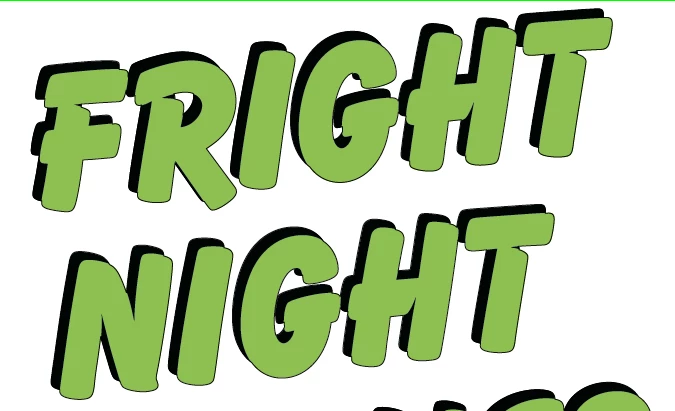
Green/Black fill = CMYK
Black outline = Cut line
 AdChoices