
Known Participant
October 17, 2023
Question

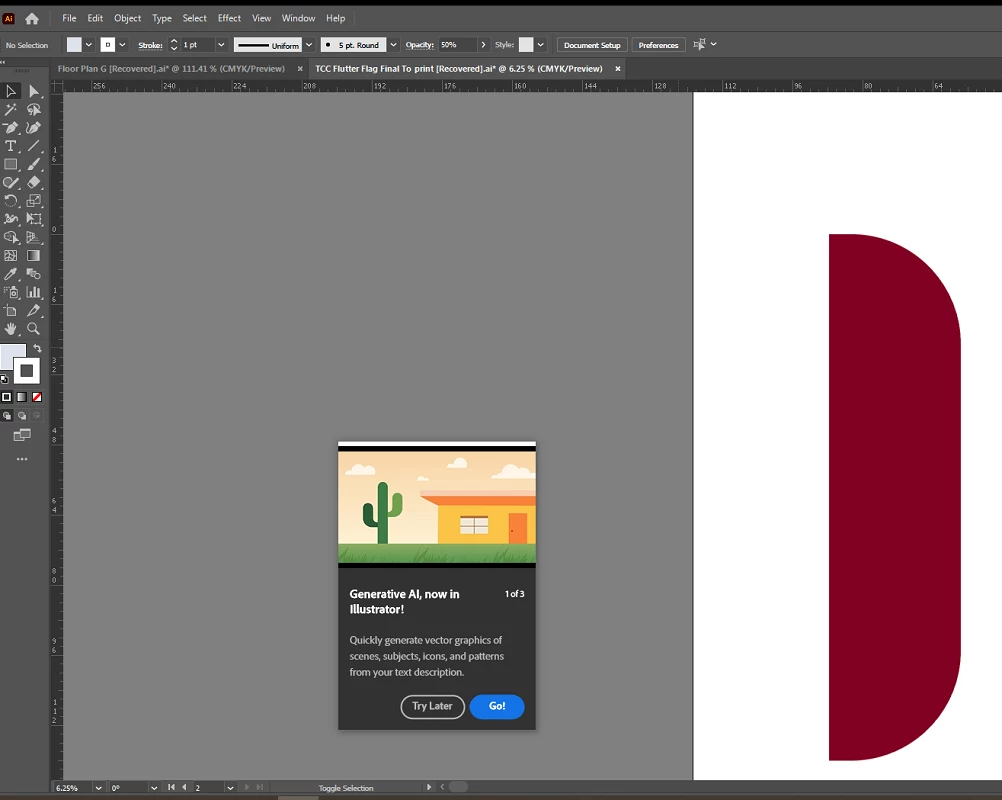
Any way to stop the "Generative AI" prompt from popping up?

  • October 17, 2023
  • 27 replies
  • 50034 views

EDIT: since it seems this might legitimately be a bug, I recommend seeing see my latest post on this thread for a Uservoice request someone else has created. If you're still experiencing this issue, please go to the Illustrator Uservoice forum and upvote/support that post.

I'm guessing this is just a bug or an inescapable prompt with the new program updates, but in the off chance ... Is there any way to get this "Generative AI, now in Illustrator!" to permanently go away? I've run through it with the "Go!" option multiple times, and I've even fiddled around with generating stuff, but it still shows up multiple times a day as if I haven't. It keeps popping up over parts of files I'm working on and interrupting me. I think it's been 3-5 times today alone. Resetting preferences (or not resetting them) makes no difference. I'm using Illustrator 28.0.


27 replies

Participant
February 19, 2024

I have the saem issue, the pop up sits there and won't dissapear no matter how many times i click on the "x" . I have to quit the programme to get rid of it, until the next time it pops up. I already have the Enable Content Aware Defaut switched off?!?!?!?!? Was there ever a solution to this?

Participating Frequently
February 19, 2024

At this point it is clear that this pop up is not a bug. Adobe needs users to start purchasing Generative credits on a regular basis. It is an advertising decision which to my mind is despicable as a subscription user. And unless there is a lot more negative feedback on this and other forums this pop won't disappear..  All I can suggest for now is that you put a Post-it-note over the offending pop up on your monitor. 

Park Street Printers
Known Participant
February 19, 2024

It's a "feature".

Participant
February 11, 2024

I'm paying way to much for this service if you can't disable that geneartive pop up. Super annoying plese resolve!

Participant
February 10, 2024

This problem still occurs 5 months later and adobe has decided to simply ignore it, yeah? 

Participating Frequently
January 17, 2024

Adobe hasn't really been listening to it's user base for years. And this annoying pop up just highlights this. It is basically just there to constantly remind us that they need to recoup the money they have spent developing these expensive AI technolgies. Unfortunately I am an old stuck in the mud and actually enjoy design and creating illustrations in illustrator so pressing a button and getting instantenous results doesn't cut the mustard. I will give Adobe some credit though, after 30 years of requesting a feature they have finally listened and introduced a basic dimension tool which you can change scales and units (which is great for signage illustration/drawings). It certainly isn't as good as Corel Draw features were or as powerful as HotDoors Cadtools Plugin but it is at least a start.

Participant
December 15, 2023

On Dec 15 I also tried all of the above suggestions and nothing worked, all that worked for me was to click "Hide" (the eye icon) in the prompt box when it popped up on my design.  At the time I had 3 Illustrator windows open, and selecting "Hide" was applied to the other open files too.  After quitting Illustrator and restarting, the prompt box is still hidden, thankfully. Not sure if the hide feature will still work when my computer is restarted, but for now, no more annoying box to move around the screen.    Maybe this is a new button Adobe recently added after seeing all the user complaints.

Participant
December 15, 2023

I just realized original post is talking about a different prompt box, sorry.  I'm not able to delete my post, so just acknowledging this : )   There have been too many popup boxes lately disrupting my workflow, got them confused!

Juniperf
Inspiring
December 13, 2023

I have this issue too. It will never go away, pops up several times per session daily

Monika Gause
Community Expert
Community Expert
December 13, 2023

@Juniperf  schrieb:

I have this issue too. It will never go away, pops up several times per session daily


Try and deactivate "Content aware features" in Preferences > General

Juniperf
Inspiring
December 14, 2023

The setting you described does not exist.
There is a "Enable Content Aware Defaults", which disabling has no effect on the issue, instead it disables previously-existing, basic tools like the puppet warp and free form gradients

maryo9747075
Participant
December 11, 2023

It's now December 10th and I am still dealing with this Generative AI prompt.  I would like it gone or money refunded.  I can't x out of it.  I try the preview thinking it will disappear and it never does.  I try zooming in on a board and it centers the prompt on top of the board hiding my work.  This is ridiculous and what is making me very angry as I see that this has been going on since October and there is still no fix.  Please fix this immediately as it is obscuring my work and does not allow me to zoom in on my work.  Come on adobe.  It's been a big problem for several months now.

maryo9747075
Participant
December 11, 2023

I had to contact the help desk sPlease press CTRL+K General>Uncheck Enable COntent Aware defaults. Restart Ai and check if it helps.ince I could no longer do my work.  They told be to do the following and it worked.

Please press CTRL+K General>Uncheck Enable COntent Aware defaults. Restart Ai and check if it helps.


howlamanAuthor
Known Participant
December 1, 2023

It looks like a Uservoice post related to this was created this month. For anyone still experiencing the issue, I suggest you post/upvote in there. Since the suggestions given here don't seem to work, I'm guessing this is likely a bug. It seems to have stopped for now on my end, so I'll post in there if it starts showing up again. It looks like several other users are still having the problem.

https://illustrator.uservoice.com/forums/939477-illustrator-desktop-beta-bugs/suggestions/47422514-please-make-clear-how-to-remove-generative-ai-popu

Inspiring
December 1, 2023

Dear Adobe. How about a "Never ever interrupt my workflow" setting? (Default on.)

Participant
December 7, 2023

Yes please!

Participant
November 29, 2023

My god, you have got to turn this off. I have no interest in this nonsense, and now i have all of our staff artists being bothered by it. Can we not march so quickly into this abyss??? PLEASE PLEASE PLEASE turn this popup off or at least give me an option to opt out. 

Monika Gause
Community Expert
Community Expert
November 29, 2023

please post this to Uservoice. https://illustrator.uservoice.com

This forum is 95% volunteers. Posting here doesn't reach the decision makers.