


Known Participant
August 5, 2026
Question

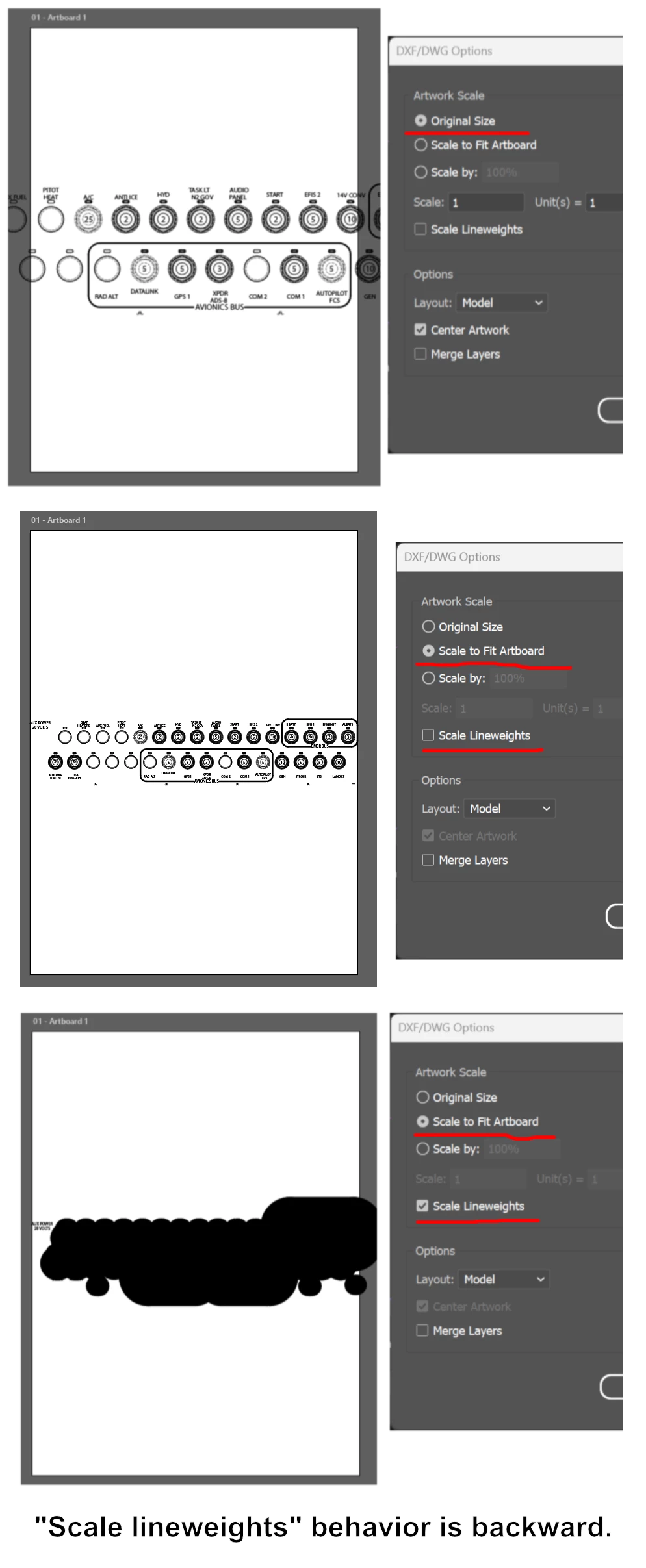
Anyone notice that "scale line weights" is backward on import?

  • August 5, 2026
  • 2 replies
  • 26 views

If you import a vector file and you opt to have Illustrator scale it, the “scale lineweights” option does the opposite of what it’s supposed to.

In this example, the drawing is being scaled down, but the line weights are unusably huge. But if you turn lineweight-scaling off, they are correctly scaled down with the drawing.
 

    2 replies

    Dave Creamer of IDEAS
    Community Expert
    Community Expert
    August 5, 2026

    I used Scale to Artboard on a DWG file and got the same results using Scale Lineweights. 

    I also had a glitch at actual size on this file. 

    (BTW, paste your screen shots as separate graphics so they can display larger. It’s hard to view them.)

    David Creamer: Community Expert (ACI and ACE 1995-2023)
    Known Participant
    August 9, 2026

    Thanks for the reply.

    I don’t recall having the graphic problem in this forum. If you right-click it and say “Open image in new tab,” it shows up large.

    WTH is Adobe doing when you click on it? Pathetic.