
은정주2002854
Known Participant
August 24, 2023
Question

app.copy(); app.paste(); doesn't work perfectly.

  • August 24, 2023
  • 5 replies
  • 403 views
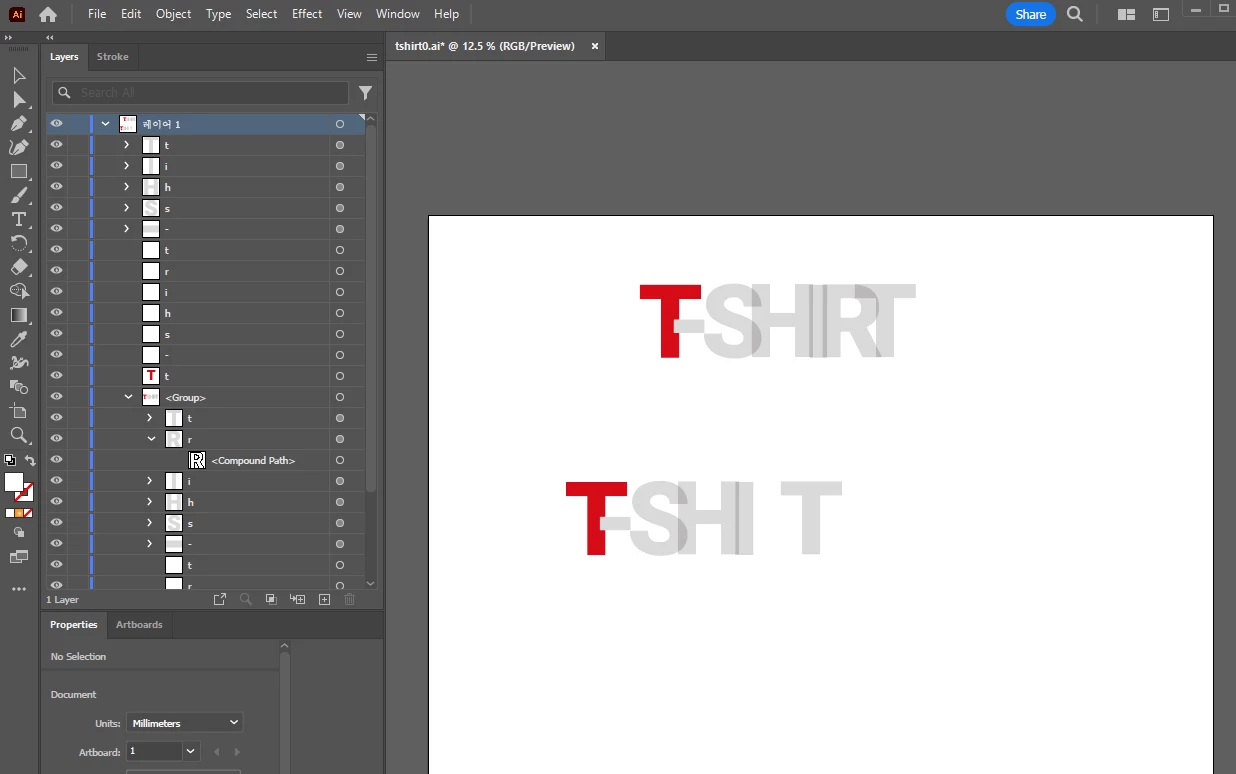
What could be causing app.copy(); app.paste(); to not work perfectly in the script below?
The R-letter is missing when copying and pasting.
It works fine when I copy and paste in the app and not in the script.
 
function load(url) {
    var loadFile;
    loadFile = new File(url);
    doc = app.open(loadFile);
    doc.rulerOrigin = [0, 0];
}
load("C:/podContents/illustrator_error/tshirt0.ai");
var layer = doc.layers[0];
var gItem = layer.groupItems[0];
doc.selection = gItem;
app.copy();
app.paste();


This topic is closed to new replies. Start a new post to keep the conversation going.

5 replies

m1b
Community Expert
Community Expert
August 24, 2023

Hi @은정주2002854, sorry I don't know why the R isn't being copy/pasted. However, I would recommend if you can use PageItem.duplicate() instead. This is a better options because it doesn't need to disturb the clipboard.

- Mark


var dup = gItem.duplicate(myLayerInOtherDocument, ElementPlacement.INSIDE);
은정주2002854
Known Participant
August 24, 2023

Thank you for your reply.

은정주2002854
Known Participant
August 24, 2023

The reason we need copy and paste is because we want to copy from the original file and then open another document to paste it into.

은정주2002854
Known Participant
August 24, 2023

I solved it.


function load(url) {
    var loadFile;
    loadFile = new File(url);
    doc = app.open(loadFile);
    doc.rulerOrigin = [0, 0];
}

load("C:/podContents/illustrator_error/tshirt0.ai");

var layer = doc.layers[0];
var gItem = layer.groupItems[0];
doc.selection = gItem;

var emptyDoc = app.documents.add(DocumentColorSpace.RGB, 714.8721 , 1716.4345 );
var copied = gItem.duplicate(emptyDoc);
m1b
Community Expert
Community Expert
August 24, 2023

Nice! Well done.