


Inspiring
November 14, 2024
Question

Appearance Panel bug

  • November 14, 2024
  • 4 replies
  • 1975 views

This problem is happening with the current version of Illustrator, version 29.01, but it started happening in the previous 2 or 3 versions.  When I first launch Illustrator, then use the stroke color option in the appearance panel, the box appears at the extreme opposite side of the UI.  It doesn't happen if I use the fill color option, and it only happens once.  The first time I try to use it after a fresh restart.  But it happens 100% of the time after a fresh restart.  When it happens, I have to wait a second, then click the stroke color option again, then maybe once or twice more to "fix" it.
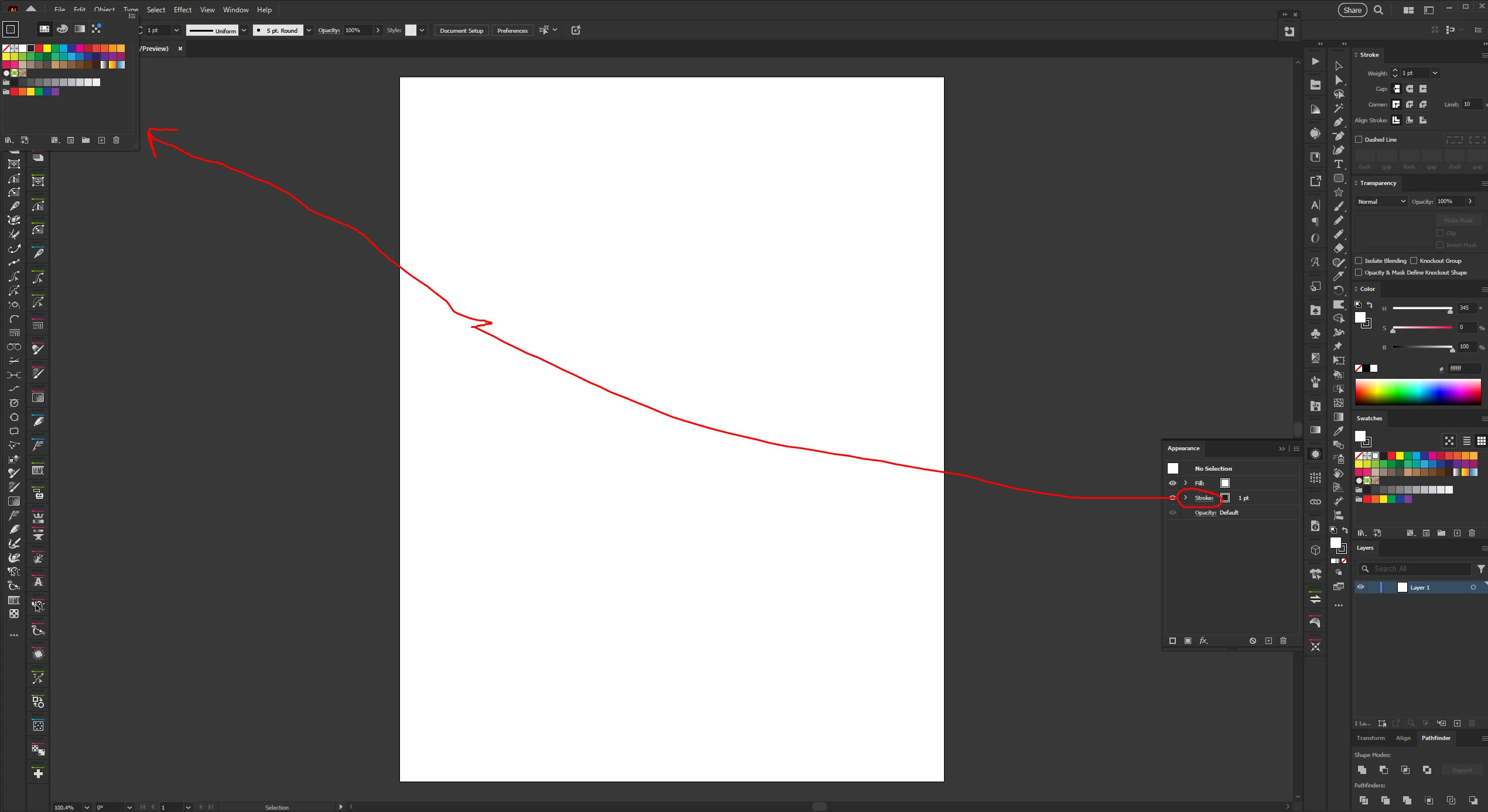
 

I'm using a Windows PC running Windows 10.

4 replies

Abhishek Rao
Community Manager
Community Manager
August 25, 2025

Hi everyone,


Thanks a lot for sharing the detailed observations. I'm checking this with the product team and will get back to you here once I hear from them.


Best,
Abhishek


KuttyjoeAuthor
Inspiring
August 25, 2025

Here is a short video of this new behavior where the stroke is jumping back above the fill in the Appearance Panel repeatedly as well as the stroke color box opening in the far upper left corner of the screen.

Kurt Gold
Community Expert
Community Expert
August 25, 2025

Yes, I can reproduce the misbehaviour as shown in your latest video, Kuttyjoe.

Ton Frederiks
Community Expert
Community Expert
June 21, 2025

Here is a recording, the swatches open in the Control Panel instead of the Appearance Panel.


KuttyjoeAuthor
Inspiring
June 21, 2025

That is precisely how it happens.  It only happens after first launching Illustrator.  After that it's OK until you close Illustrator and reopen.  If I go back to an earlier version of Illustrator the problem is not there.

Anubhav M
Community Manager
Community Manager
June 24, 2025

Hello @Kuttyjoe,

I have sent you a DM. Kindly check.

Anubhav

Dave Creamer of IDEAS
Community Expert
Community Expert
June 21, 2025

I'm not seeing this problem on my system.

AI 29.5.1

Windows 11, 24H2, 26100.4351


Are the persons seeing the problem all on Windows 10?


David Creamer: Community Expert (ACI and ACE 1995-2023)
Ton Frederiks
Community Expert
Community Expert
June 21, 2025

The OP uses Win, I see it on Mac.

Dave Creamer of IDEAS
Community Expert
Community Expert
June 25, 2025

I saw it quickly on my Mac but the second time I selected the swatch, it worked properly as the OP mentioned.


David Creamer: Community Expert (ACI and ACE 1995-2023)
Anubhav M
Community Manager
Community Manager
November 14, 2024

Hello @Kuttyjoe,

That does seem strange. I tried replicating this behavior on my end but could not. Would you mind sharing a screen recording of your exact workflow and the problem, so I can check this with the team?

Looking forward to hearing from you.


Anubhav

KuttyjoeAuthor
Inspiring
November 14, 2024

There's not much to record.  I launch Illustrator.  I create a blank document.  I open the appearance panel and click the color box for the stroke and it happens.  That's all.  If I close Illustrator then immediately relaunch, it will do it again.  Once I get past it, it doesn't happen again until I close/reopen Illustrator.

Kurt Gold
Community Expert
Community Expert
November 14, 2024

I can confirm the misbehaviour in Illustrator 29.0.1 on a Windows 10 machine.